
The Viper Mini
The Razer Viper Mini is a wired mouse released 5 years ago with average specs, mediocre clicks and the worst software ever made. And yet… this mouse is legendary and adored to this day for two reasons: the shape and the price. Mainly the shape though, it’s so good that when it released it set the standard for what a smaller mouse should look like and shifted the landscape away from egg shapes like the g203 and towards where the market stands today.
At the time, I chose to main it over way more premium options because of just how comfortable it was to hold and how well I played with it. But, despite that influence and popularity, Razer never made a true viper mini wireless. Well, we did get the Signature Edition, but the whole appeal of the viper mini was that it was good and affordable. This, was not the latter. So because we never got a proper updated version, even 5 years later, a mouse that so much as shares a resemblance to the viper mini in terms of its shape will be hyped as an exciting option for people looking for that elusive viper mini wireless.
So, understandably, there’s been a bit of buzz surrounding the Pwnage Trinity CF.
Finally, a wireless Viper Mini…?
When first picking it up my impression was that this felt familiar, and yeah. This is it. This is the viper mini wireless we never got.
The shape is almost a 1:1 copy and it has the modern specs you’d expect from a mouse released in 2025. The weight is very impressive too, at 40 grams it’s actually even lighter than not only the wired viper mini but razers wireless version too, and it does all that at less half the price of the signature edition.
This is the least impressed I’ve been with a mouse in a long time and the worst part of it is just how long it took for me to figure out exactly why.
Because like I said, it should be good, it should be fantastic! But I just… hated playing with it? And honestly I almost appreciate it for that reason—every once in a while a mouse will come along that will change how I think about and value each aspect of one.
The GWolves HTX changed my view that 50 grams was as light as mice needed to be, Endgame Gear’s OP1WE shifted my evaluation on the importance of shape and then they did it again with performance and structural stability on the OP18k.
All of these mice established what I believed to be the core set of features I valued most within one, weight, shape and performance. But this mouse excels in all of those areas, so what went wrong for me to still dislike it so much?
So what’s going on?
I tried it in Battlefield and Call of duty first; these games require very fast flicks which is where I usually like a lighter mouse but it just… didn’t work. I was so shaky at the end of my flicks and there was this delay after every movement I couldn’t get rid of.
What about other games then? I tried Counter-Strike and it went a bit better but this mouse just feels so… off. Any large movement still had that shakiness to it and it somehow felt slow.
I thought that maybe, I just had to put in more force to make those movements because of DPI deviation, that shakiness caused by that extra inertia of a slower sensitivity. So I checked and it was a lot slower! My op1 measured at 1640 dpi while this measured at 1450! But even after accounting for it with the in game sensitivity, movements still felt more sluggish than they did on my OP1.
I also thought it could be latency. When playing KovaaK’s I noticed my movements did feel a bit delayed, and when testing it against my op1 it had 5ms more motion latency. But then, I restarted the mouse and it went back down to its usual +2. It’ll occasionally jump back up to 5 extra ms after being woken up from sleep mode, but the issues I’m feeling are consistent. This isn’t.
Am I just not good enough to use a mouse this light? My main is the op1 and it is 50 grams, maybe I don’t have the mouse control to use something that weighs a little bit less? So I tried the HTS Ultra, a mouse even lighter than the Trinity and…
Okay yeah that’s not the problem. If anything, I actually really liked the lighter weight. Even though the trinity was already 40 grams the HTS was noticeably easier to move around.
And that gave an idea. What if I took out the battery? I don’t mind using wired mice anyways and the extra weight reduction might help make it feel a bit less dense.
Removing the Battery
So I took the mouse apart.
But when going to remove the battery, I noticed something: It was placed at the very back of the mouse.
This is a bit strange, not unheard of but generally mice have their batteries at least up a bit? This one was basically touching the back wall. I didn’t think much of it though, took it out and tried playing with it wired and sure enough, it did feel better.
A lot better.
That shakiness at the end of my flicks was entirely gone, the delay between movements minimised too, it was so drastic that there was no chance this was entirely and exclusively caused by the 5 gram weight reduction of removing the battery. I went from hating my time using this mouse to actually not minding it? Something else had to be contributing here.
The missing piece of the puzzle
I haven’t really put a lot of thought into how the weight of a mouse is positioned before. The numerical weight itself, yes, and I had been swapping to lighter and lighter mice over time, but that trend stopped at the OP18k for me. I went to it from the far lighter GWolves HTX, but despite it being heavier, it really didn’t feel like it.
At the time I put my preference down to the various other ways the OP1 is better but, what if the reason I didn’t mind the weight increase was how that weight was balanced?
The OP1 is wired—it doesn’t have a battery. So when I went to make a movement, the majority of the weight I had to counteract to stop the mouse is at the front of the mouse, right around where my fingers naturally sit when holding it.
On the Trinity though… both the incredibly low battery position and adjustable sensor railing (I’ll get to that in a bit) create all this momentum from the very base of the mouse which I can’t apply pressure to. This is where that shakiness was coming from, I couldn’t counteract the momentum created from wider flicks.
Removing the battery shifted the centre of mass further upwards, closer to my contact points and honestly, fixed the mouse for me. When I said I hated my time using it before—that wasn’t an exaggeration. It was a struggle to get myself to get background footage for this video because it just felt so unwieldy.
The Nuance of Weight Balance
I’m not sure if this will be felt to that extent by everyone. People hold mice differently and do I place my fingers unusually high up, especially on the right side, which is probably why I favour forward weight balancing more than most seem to.
Maybe someone with a different grip would love this type of weight balance. Plus, I know I am a little bit overanalytical with my own mechanics and the issues I was noticing with my aim probably weren’t actually as bad as they felt to me. And like I said before, I actually do appreciate this mouse a little more now for making me aware of just how important good weight balancing is. It’s given me a much better understanding of the topic as well as making me think about why I do or don’t like certain other mice in my collection. Maybe this is why I like the OP1 so much after all, not the build quality or shape.
I will say though, this is a very extreme example. For most mice, weight balance hasn’t been something I even considered because it never stuck out this much, even if other mice also had batteries positioned very far back.
But it has made me wonder, how precise do we need to get with weight balance?
Do tiny shifts in the position of the centre of mass impact how a mouse feels to use in any noticeable way? Or is it only something that matters when it’s not done well or is incompatible with your grip style? I’d love to experiment with this a bit more in the future, maybe hollow out a mouse and place weights inside at different points to see how much each one impacts how it feels to use. But that’s a project for another time.
The Pwnage Trinity CF - is it good now?
So, after all this, is the trinity good now?
Not really, not even considering the effort I had to go to to make the mouse feel as okay as it does, it still just feels okay.
But before I talk about what else this mouse gets wrong I do want to talk about the two things it does do really well, the first of which being its entire reason for existing: The sensor can move.
The Movable Sensor
This is such a seemingly minor thing that I think its impact will get overlooked, especially since most people don’t understand what sensor position does. But make no mistake, this is this mouse’s standout feature. At least for me personally it completely overshadows the shape; the mouse could have looked like a transformer and I still would have been interested in trying one.
So, why does a moving sensor matter?
The core of it is that by shifting the sensor physically upwards the same physical angle change will translate into a larger angle change on screen, but that increase is much more noticable when moving the mouse with your wrist.
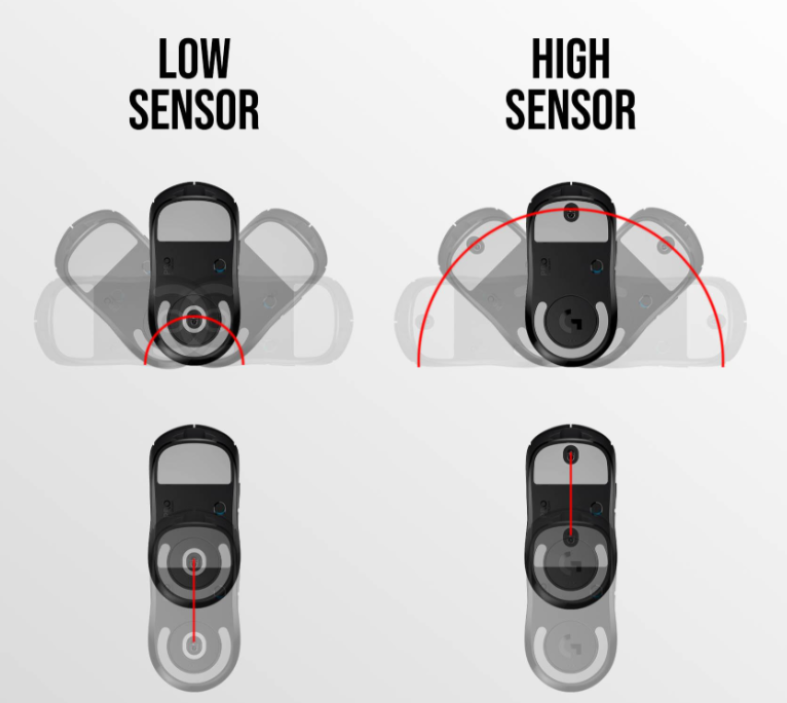
So, it is different from having a higher sensitivity or DPI which would increase the speed of wrist and arm movements equally, and since this isn’t something that can be changed by software, for most mice their sensor position is something you’re stuck with.
Personally, I hate how low sensors feel. They create horrible disconnects between movements with my wrist and with my arm, and there are some mice I just, can’t use because of it. (EDITOR’S NOTE: after this was released, BardOZ has become an outspoken proponent of low sensor position as he feels it provides a greater level of granularity for wrist aim in tacfps)
And I think for people who grip a bit further back, some of the mice I really enjoy for their more forward sensor position could feel awful for them. So having the option to change it, either because you know what sensor position is optimal for you or to experiment and see how different ones impact your aim, is amazing and this review wouldn’t be complete without giving credit where credit is due.
Pwnage’s Patent Predicament
And now I get to take away that credit!
For anyone who hasn’t seen, Pwnage put out a tweet a couple of days ago threatening to “pursue appropriate measures to protect our intellectual property” against G-Wolves who were also tweeting about implementing adjustable sensor position on their mice. And honestly, I don’t really care if they are legally in the right or not, the only reason people talk about Pwnage’s mice are because of the shapes they straight up copy from other companies.
Those companies put in the time, effort and money into research and development to make a fantastic shape which I’ll be talking about a lot more after this, not Pwnage. Pwnage didn’t do any of that. And shape is the most important part of a mouse—the adjustable sensor position is impactful and a bigger deal than I think most people realize, but it doesn’t hold a candle to getting the shape right.
It just comes off as incredibly hypocritical to be trying to defend their patented adjustable sensor position while also only being known as a company for taking popular shapes, and frankly it’d be disappointing if the only place you could get a mouse with an adjustable sensor from was a company with as bad of a quality control track record as pwnage.
Anyway.
Shape
The next noteworthy element of this mouse is it’s shape. Like I said before, it’s basically 1:1 with the viper mini, a legendary design which has stood the test of time so well for, in my opinion, one key reason: Its malleability.
This is a strength it shares with the most popular gaming mouse around, the G Pro Superlight. The GPX fits anyone, and the viper mini tries to do something similar, but for smaller hands. I think the viper has a smarter approach to this idea though by maintaining some of the features seen on mice that try to specialise a little more, but in very carefully considered amounts.
Side Curvature
The best way to get this idea across is to look at the opposite: the Endgame Gear XM2. There is a very clear “proper way” to hold this mouse, and it feels great if can hold it that way. If you can’t though… it doesn’t really work. There’s no room for flexibility with finger placement due to the side curvature and you’ll find yourself almost getting pushed back to that “proper” position.
The GPX sits at the polar opposite end of that spectrum, where it’s so neutral that there is no proper position. And this is fine, but it’s just fine. While it works for a lot of people, there’s a decent chance that a mouse that specialises a little bit more would work even better.
The viper mini on the other hand tries to strike that balance where there are features to make certain grip styles feel more comfortable but doesn’t place too much emphasis on any of them.
Consider that intended grip for the XM2 again for example. Trying it on the Superlight: my fingers just kind of rest against its fairly uniform sides, but the viper mini offers just a bit more flair that give my pinkie and ring more defined points to sit against and push of off in the same way the XM2 does.
At the same time though, this isn’t done to the extent that it comes at the expense of other grip styles. My relaxed claw grip still feels stable here, whereas on the xm2 that same ridge forces my fingers to uncomfortably curl around it.
The Back Hump
The back hump also offers some stability for claw, not as much as something like the xm2 but it still lets you pull the mouse into your palm for extra support when flicking while not being intrusive to the point where you can’t move the mouse around with your fingertips. Which is also the reason I think it’s fairly popular for fingertip grip.
Being thinner around the centre gives people who like that gripstyle a more precise-feeling experience than a wider mouse does if they choose to hold it there. But again it’s a choice and comes back around to malleability. This shape is just so flexible and well suited to a variety of styles that it’s no wonder it has as many fans as it does. And it’s no wonder pwnage chose to copy it for this mouse.
Just as a reminder, this isn’t pwnage’s creation. And while this is common practice in the mouse market, I think it’s important to keep in mind because it is one of only two things this mouse does well. This is where my praise ends.
More Issues :D
Believe it or not, removing the battery wasn’t the only mod I had to do to get this mouse into an acceptable state. There were two other stock features that basically had to be addressed before this mouse felt comfortable to use: the skates and the coating.
Skates
The stock skates were some of the worst I’ve tried honestly—it’s not uncommon for me to swap to aftermarkets since stock is rarely good, but it’s not often that a skate feels this bad. It was a lot slower than good skates overall but more specifically made starting movements harder relative to continuing them. So microadjustments felt really muddy and didn’t provide the equivalent benefits to stopping power that you’d expect from a slower skate. And all that was compounded by how scratchy they felt on more textured pads; it was so bad that I swapped them out after 20 minutes or so.
Coating
The second big issue was the coating. Grip tape is basically mandatory here, at least for me, since the coating on this mouse is not good at all. I never have issues with coating—I have very dry hands so while I do choose grip tape over it if I can, it’s very rare for a lack of grip to be an active issue, more just something to be potentially improved upon. But here? I felt like the mouse was trying to escape from my hands. Especially on the buttons, my fingers just slide right across it in a way that doesn’t happen on other mice and it led to my grip feeling incredibly unstable. (To add a small caveat to this, apparently the other colourways have better coating than mine which is the full black version, so this criticism might not apply on those versions.)
Build Quality
The final issue I want to talk about is the build quality. And to be honest, if I hadn’t had this happen with another mouse before the build quality here could have given me my second big revelation about how important each aspect of a mouse is.
Structural stability is one of the last things I’d list in terms of importance, obviously the mouse can’t snap in your hands but other than that, why’s it matter? Because a premium mouse should feel appropriately premium, and this feels like a toy.
If you’ve watched other videos about this mouse you’ve seen this flexing on the bottom of it but the sides on my unit aren’t stable either, they creak with the slightest pressure and it’s not hard to actually force them inwards with a bit more. This actually mattered in gameplay for me too—compared to the OP1 I didn’t feel as confident moving this mouse around, especially when I’d hear it creak while playing.
Clicks
The clicks not only move vertically when pressing them but the amount of force needed to activate them varied as well. Lower on the buttons they felt light and snappy but higher up that force easily doubles, so that full fingertip grip I mentioned earlier wouldn’t work after all. I know some people have said that these kind of build quality issues are pretty standard for carbon fibre releases but if this is a given from using the material then I don’t know if it’s worth using until it can be done right (EDITOR’S NOTE: since then the WLMouse Ying has come out, and while it has QC issues, does not suffer from these build quality problems on good units), especially since I’ve seen other units that had far worse issues than mine.
Either way though, I hope the overall build quality is going to, or maybe already has, improved for future batches of this mouse.
Closing Notes
With my reviews I like to try and strike a balance between positives and negatives. Even for a pad like the Hien which I don’t like at all, I try to understand why someone else would.
But I think for this mouse, I’ve kind of already talked about why people might like it, because there’s only those two reasons, the shape and sensor position. And even then the adjustable sensor position probably contributed to this mouse’s awful weight balancing.
I’m not saying that every other aspect of this mouse is terrible but none of them are up to the standards that we should hold mice at this price point to. The pwnage trinity costs 140 USD and it just does not compete with other mice in its price range. I know that compared to the viper mini signature edition 140 isn’t terrible, but I don’t want to give this mouse a pass on the value front just because that one is even worse. Especially when there are mice offering so much better value for money.
One more thing, I just want to say that I know this review won’t make me many friends in this community but I don’t hate pwnage or dislike people who like this mouse, I know that people enjoy things for different reasons and some people aren’t looking for minmaxed aiming performance and just want to see a shape they like modernised and that’s fine.
But my focus with my reviews will always be on how peripherals impact performance and what we can learn from what works and what doesn’t, so that’s what I focused on here and why I didn’t spend as much time on things like build quality, or the side buttons or shell flex. I don’t think they’re as relevant for me, but if you do wanna hear more in depth thoughts about those elements of this mouse, I’d recommend checking out some other reviews. Either way, thanks for watching.