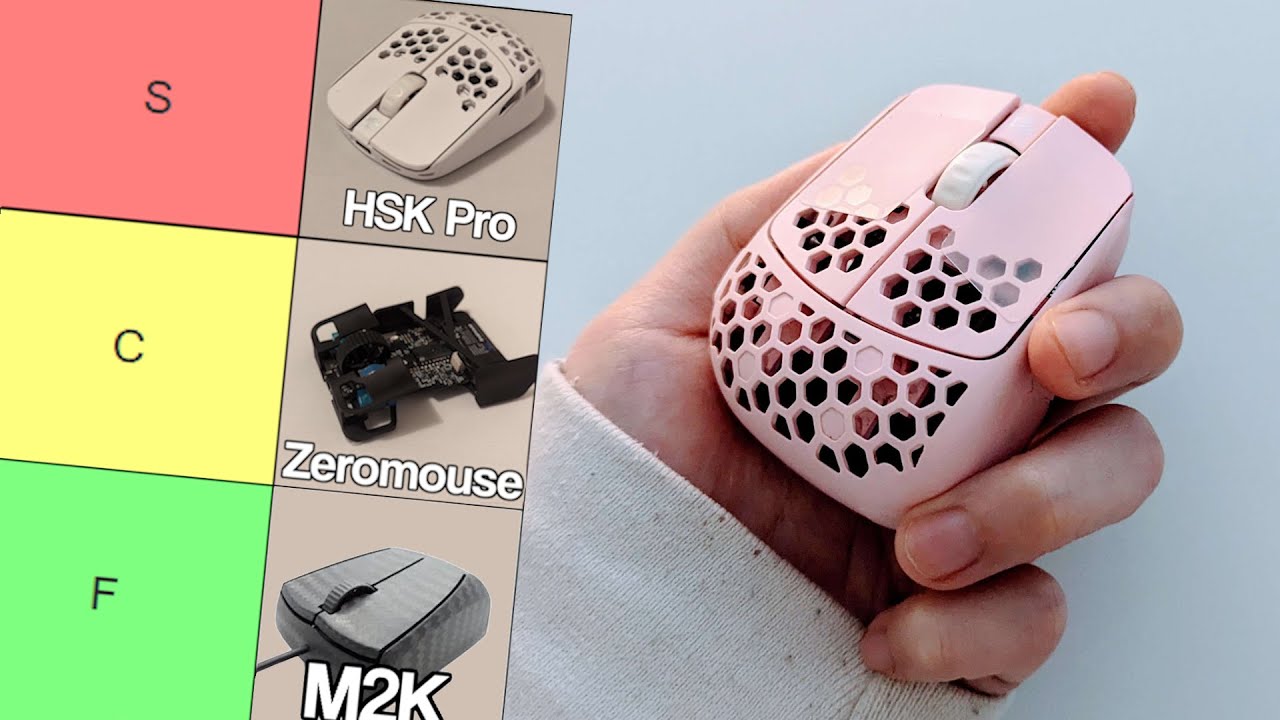
- G-Wolves Husky
- G-Wolves HSK Plus
- Zaukoenig M2K
- G-Wolves HSK Pro
- Keychron M4
- Darmoshark M5
- Darmoshark M3 Micro
- Orbital Pathfinder
- G-Wolves HTR
- G-Wolves HTX Mini
- Pulsar X2F
- WLMouse Beast Miao
- G-Wolves Fenrir Max
- G-Wolves Fenrir Asym
- Zeromouse Blade
- 3D Printed Fingertip Mods
- Mighty MM8K
…Why?
For the past three years I’ve been using tiny gaming mice, mice shorter than the size of my palm. It started off as just an experiment in 2021, trying out these strange, stubby mouse for a little bit. But at some point I just couldn’t go back to normal sized mice because I was just playing better with the stubby ones.
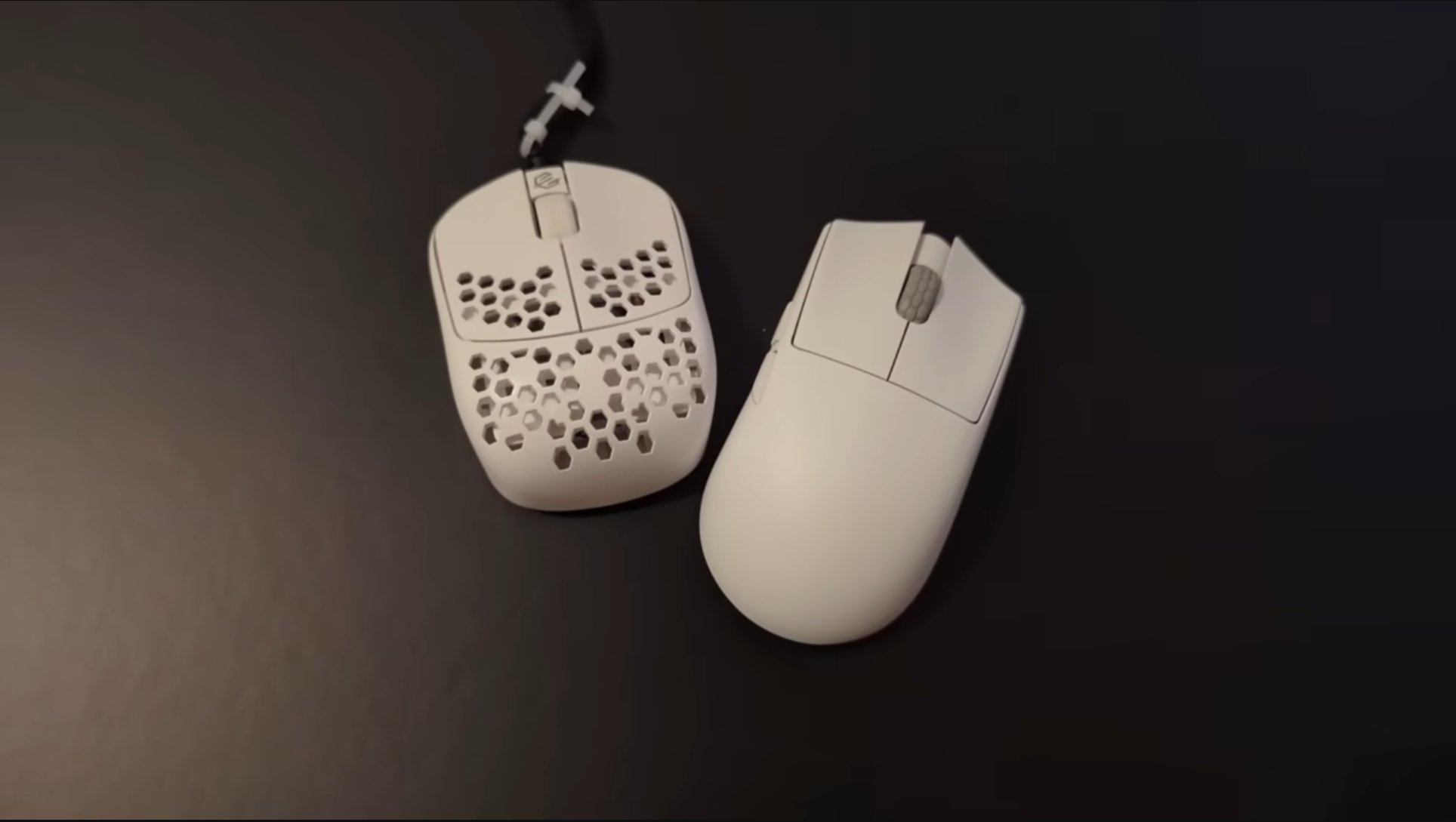
Here’s the idea: because I never make palm contact, we can cut off the back half of the mouse, doubling our fingers’ range of motion and halving the weight.
If your goal is to make your fingers play the largest possible role in your aim and you don’t mind a fairly steep learning curve that might initially hurt your aim, I think these mice are the best way to do that.
So, as somebody who has tried pretty much all of them and has exclusively mained these mice for a couple thousand hours of gameplay, let’s talk about what’s good and what’s not.
But I have a few things to talk about before we get into the mice.
Ranking Criteria
First, just because you use the fingertip grip doesn’t mean you should necessarily use fingertip mice. While they do promote additional finger usage, it comes at the cost of stability, arm engagement, and makes it harder to avoid deathgripping under pressure. And for those who don’t physically move the mouse with their fingers that much, use them mainly for micros, or find that ultra lightweight mice are uncomfortable, you could just go for a low profile, fullsize mouse like the Beast x Mini, Hitscan Hyperlight, MCHOSE L7, Pulsar Crazylight Mini, or things like that, and have the option for palm contact and better stability. With bigger hands you can basically consider any mouse for fingertipping too, so long as the hump permits it.
Second, the fingertip grip is the one that likes to have good, grippy coatings more than any other grip, and so many of these don’t have that to the point where I’m not gonna factor it into my ratings. I just recommend you get some grip tape. If you don’t mind tackiness, the Cicada Wings v2 are great, and if you want something that feels more like hockey griptape, you can try BTL.
Third, this is the way I hold mice and this is my hand size. I’ll try holding these mice with other grips to see if they make sense, but ultimately all of my opinions are filtered through my personal experience.
Fourth, while I have to assign a letter grade to every mouse, your experience will vary a lot based on what you want out of it. I will take off points if the shapes are overly limiting or alienating, but keep in mind that if you are in the exact use case a mouse is designed for you might love a mouse that I put in D tier. Personally, I think the downsides that come with fingertip mice are too great to just not lean into the benefit of finger mobility at all, so mice that completely restrict your range of motion will lose points. If you just want a really lightweight object to aim with then your mileage may vary though. I’ll try and talk about who I think each mouse would be suited for in my reviews.
And lastly, none of these mice are objectively bad. You can absolutely do fine with all of them and they all have pretty performant specs. I just like splitting hairs in a really small niche!
G-Wolves Husky
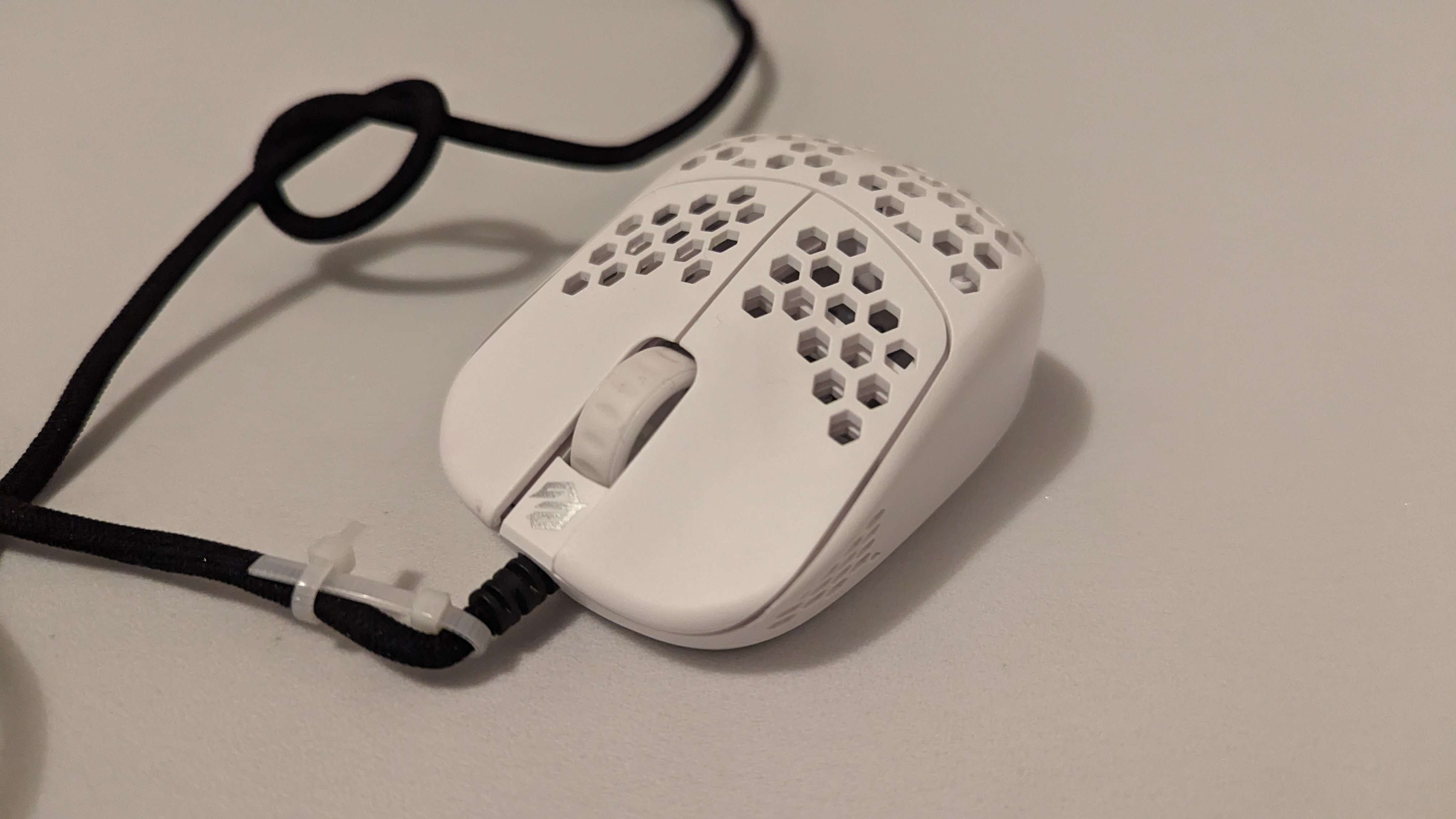
So, let’s start with the first fingertip mouse I ever tried, and one I talk about quite a bit in my main channel video. The G-Wolves Husky, or HSK. The shape is like a mouse that got cut in half, the dimensions and width are pretty normal feeling, we’re just missing half of a mouse. This genre of fingertip mice, which we’ll call half mice, is what I think most people would be looking for: not really a transformative experience, just something that feels familiar and gives you a bit of extra agility.
While I sing its praises in that main channel video, it was mostly through the lens of “really good for the time.” So:
Not bad actually… but it is a mouse from 2020, and things like it having a wire, being 38 grams, and using an old sensor do make it feel a little bit dated. But the wire is actually decent, it’s not quite as good as modern mice but I don’t dread using it. The weight is still at the top of its class for this form factor for some reason, with two mice having come out since then with very similar dimensions… and both of them also being 38 grams. And G-Wolves has always been a bit ahead of the game in terms of sensor performance so it actually feels totally fine to me, so long as you don’t mind not having higher polling rate.
The only strange thing about it is probably the shape. While I say it’s like a mouse cut in half, the curvature on the sides aren’t exactly like normal mice. The sides bulge outwards, giving it a slightly bulbous feeling in the hands. And the hump is higher than it probably should be: it’s not like you can really switch to claw grip on the fly so the hump being so high just seems to get in the way. If your hands are even smaller than mine, I could see that kinda killing the shape for you, but neither of these things bother me that much.
I still think that, five years later, this is the only mouse in its form factor and price range that I don’t have any major complaints with. If it weren’t for its wireless cousin, I might honestly still recommend this thing as a starter fingertip mouse.
Keeping in mind its dated characteristics though, I think I’d put the original HSK into:
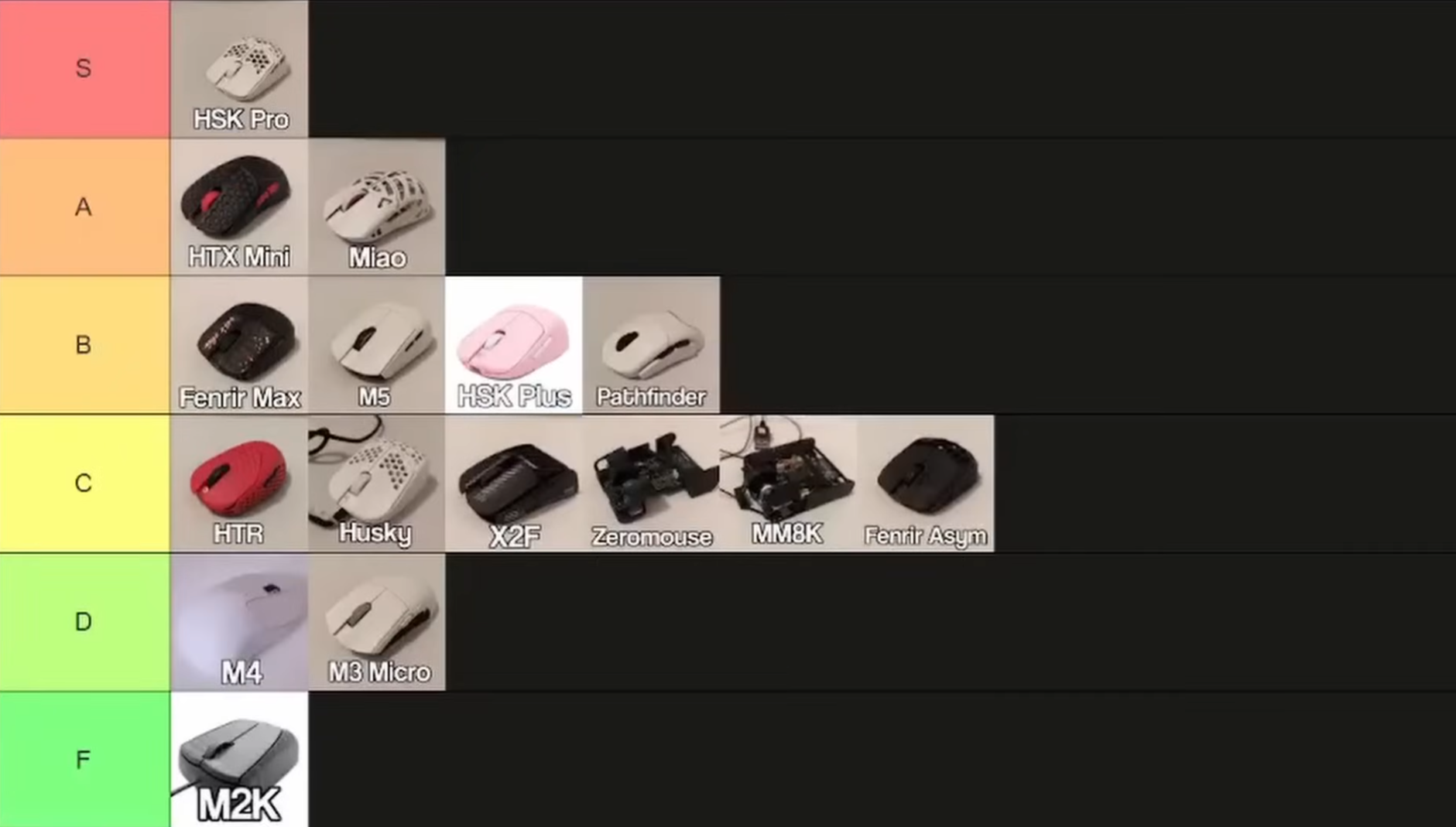
C tier.
G-Wolves HSK Plus
But the wireless variant, the HSK Plus, is a different story.
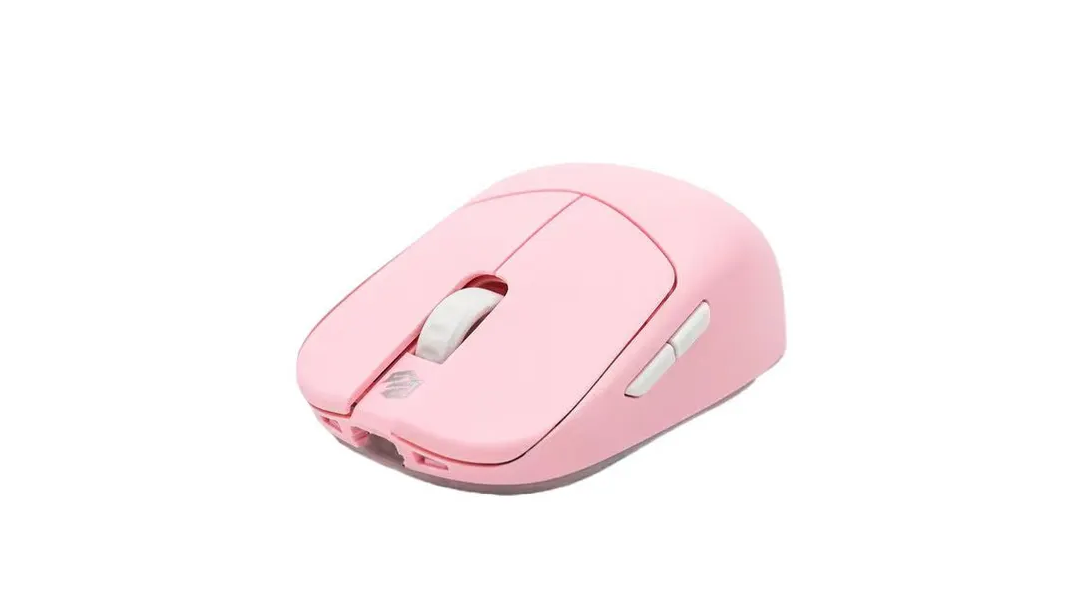
The main downside of the dated cable is gone, and somehow they maintain the exact same weight, probably because their battery game is still way better than everybody else’s right now. The 4k version of it is probably not worth it anymore, it’s just way too expensive for what it is. But the HSK Plus Lite offers that shape I just spoke about in an affordable, wireless package; you can find it for $50 to $70 on Amazon, a website with a notoriously generous return policy.
I’ve been a little bit wary of recommending the original HSK these days, but recently a friend of mine, a really seasoned competitive tf2 player with great aim, showed her mouse grip on the OP1 and all of her fingers were pinching the third of the mouse to allow for finger mobility. And I was like, “yeah no, I think you might be the exact target audience for a fingertip mouse”.
Now, I get a dm basically almost every day about how this is the best she’s ever aimed in the 12 years that she’s played TF2.
So yeah, I think if you’re interested in this sort of “cut in half mouse” style of fingertip mice, this is a cheap and relatively safe way to try it! If we’re talking purely value, this would go in A or even S. But disregarding that, it probably belongs in the:
B tier.
Zaukoenig M2K
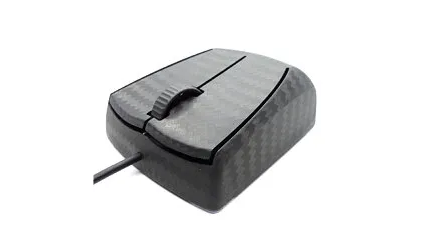
Then, we have the first and most infamous fingertip mouse, the Zaukoenig M1, 2 and 3k. I’ve only used the M2K, so that’s what I’ll speak on. This mouse made a splash on YouTube when Optimum covered it years ago and for a lot of people, it was the holy grail of mice. For me included, when the M2K came out I thought it would be an awesome video idea. It’s a 24 gram, carbon fiber fingertip mouse that came out around 2020, costing around $400 USD. A stupid price, but admittedly, the pcb technology they use is still ahead of pretty much everybody else.
But I… hate this mouse. The biggest dealbreaker is the rubber cable: it’s got a cable that is supposedly the lightest rubber cable on the market, but… that’s like saying it’s the best tasting spoiled food. (i later tried the rubber W1RXD cable and it’s actually pretty good, so if the M3K is anything like that it might solve this issue) With a mouse this light and a cable this rigid, you are aware of it at all times, and even with the zip tie mod I could not get it to feel anywhere close to as free as a wireless mouse. Even the worst lightweight cables from terrible brands like Glorious were several orders of magnitude less annoying than this garbage.
Then there’s the carbon fiber itself: it’s not grippy at all and forces you to use grip tape. It felt kinda brittle, like dry skin, nothing like the smoother modern implementation on the Ying. I wouldn’t care that much if they didn’t charge 400 UNITED STATES DOLLARS and have this cute little habit of postponing order fulfillment: they’ll estimate three months waiting time and repeatedly go “oh sorry we ran into another problem I promise we’ll sort it out” and suddenly it takes 9 months to get your mouse. They have been doing this for 5 years.
As for software, which usually I don’t care about unless it’s really obnoxious, this one… I don’t even know where to begin. They believed that no software meant that there would be less latency and everything could be onboard. But their solution was to make you input the konami code every time you want to change your DPI.
To change it you had to lift the mouse off the pad, hold both buttons for 5 seconds and then count the number of little jumps the cursor does to figure out what dpi you’re on. It’s like up and down for 100 dpi, but if it moves right it’s 1000, and then hit the right or left mouse button to adjust the DPI in increments of 100. It’s so stupid, surely this is not worth the lack of software. And there’s more nonsense you have to decipher for other settings like LOD, angle snapping, polling rate. It’s just bad.
And then to top it all off, this thing’s shape makes zero sense to me. It starts thin at the back and then gets wider towards the front. I don’t know who this is for or what grip this would suit?? It just made me feel like my ring finger was permanently fighting the front of the mouse to find a comfortable spot. Casually browsing I would switch to 1-3-1 because it was way more comfortable, and I have never done that with any other mouse ever. I don’t get why people clone this shape, it feels like they didn’t think about it at all, or they went out of their way to make a mouse feel as wide as possible. And maybe the M3K is better, but I’m not about to drop another $400 dollars to find out. I have to give them some credit because The Great Zaukoenig Scam Mouse probably inspired GWolves to make the Husky, ultimately creating ftip mice as a niche. But yeah, a great technical achievement, but an awful mouse in my opinion.
F Tier.
G-Wolves HSK Pro
After that, came the main character of my fingertip mouse video, the HSK Pro.
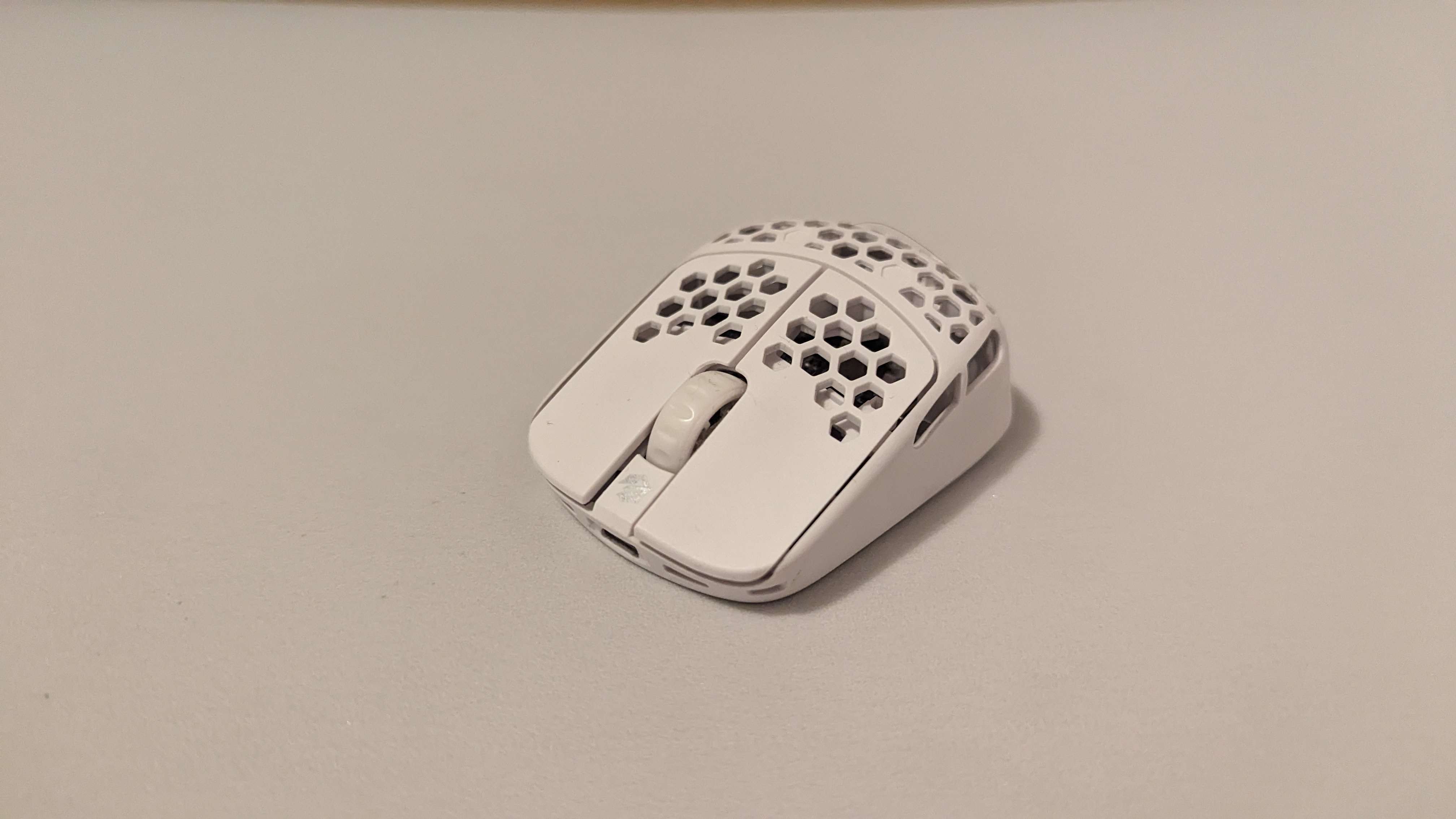
This thing is 26 to 29 grams, has great sensor implementation, a shape that gradually slopes inwards on both sides, exceptionally low button height, and generally, it’s just tiny.
I wasn’t lying when I said that I have 1000 hours with this mouse and that it’s still the one I go back to if I’m not testing anything. In my eyes, this was the first mouse of its kind in a totally different genre of fingertip mice: pen-like mice. The experience is just wholly different from the other mice on this list, where your fingers are forced to play such a big role in your aim that it becomes hard to use anything else. But I love it for that reason. It gives me so much range of motion and fingertip engagement, and ultimately that’s what I want out of a fingertip mouse.
But it did actually take me a couple hundred hours of practice to have gameplay that doesn’t scream “this person is using an HSK Pro!!” Depending on your finger control and tendency to grip the mouse under pressure, this transition may be faster or slower for you, but regardless, it does come with a whole laundry list of downsides that I don’t recommend taking on unless it really sounds like something you’d like. You can train away a lot of the downsides this mouse initially imposes on you though. If you want a longer and more detailed review of the mouse, there’s one at the very end of my main channel video.
But aside from its explosive launch, subpar battery life, and the side buttons being positioned quite strangely, I find it hard to give it anything other than S tier. It’s still the lightest commercial mouse, and it’s the only properly good mouse in its archetype. Even after trying upwards of 50 other mice since then, I still come back to this mouse when I just want to play well. I think it does what fingertip mice are most uniquely good at better than any mouse, and if you don’t like it, it’s probably not a hand size or grip style thing, you probably just don’t like the niche it’s going for.
If you’re on the fence about buying the 1K or 4K version, the 4k version has kinda heavy clicks and is 3 grams heavier, but otherwise they’re both very good! I think the 1k one definitely wins in the value front, but GWolves higher polling rate is also quite good, so it’s up to you.
S Tier.
Keychron M4
The next mouse that came out, and the only other one in this penlike genre is the Keychron M4.

If you’re into keyboards, this is a brand that you might recognize. This mouse came out of nowhere; at the time, G-Wolves was legitimately the only one making readily available fingertip mice, and the only other brand willing to try their hand at it was Keychron.
This mouse was not really designed with FPSes in mind; it was meant to be an ultra portable mouse primarily for productivity, but they just happened to slap a 3395 with 4k capability on it. It also has Bluetooth if you do actually want to use it for productivity on the go.
So how does it compare to the HSK Pro? This shape is very peculiar, I’m not really sure what the thought process was. It’s the thinnest mouse I’ve ever used (barring the Titan-1) but it has some pretty aggressive “comfort” curves for some supposed pinky support.
While I didn’t hate the shape, it is very inflexible; if your grip is not compatible with these really tight curves, you will be very uncomfortable or otherwise limited. Sadly I don’t have one with me in Australia to do any side by side comparisons or refresh my thoughts on it, but I do remember playing really bad with it. Flicks were okay… but tracking felt so much harder than normal to me. At the time I think I chalked it up to its forward sensor position, but after using the HTX mini, I think that’s probably less likely.
The likely culprits are either sensor implementation or its relatively high weight. Mouse movements did feel a little sluggish, which might be why reactive tracking stuff felt so bad, and it’s possible the weight made it so finger engagement was less intuitive. While 35 grams doesn’t sound like a lot, you have to remember that it’s only a little bit bigger than the HSK Pro. So nearly a 50% increase in weight in a similar feeling package. I’d be curious to see what the battery looks like and where it is, since that’s really where GWolves saves the most weight relative to their competitors.
But yeah, we have a mouse that’s a bit lacking in terms of specs and an unsafe shape, making it something that I find very hard to recommend. Unless the shape is really speaking to you, I think the only use case it has is testing out what it feels like to use a pen-like fingertip mouse at non-HSK Pro prices. The 1k version of this mouse is about $70, which is about half of the hsk pro 1k. But still, I don’t really know anybody who’s mained this mouse for a long time. Maybe with some mods it could be good, but as it stands, I think it’s an adventurous idea executed pretty badly.
D tier.
Darmoshark M5
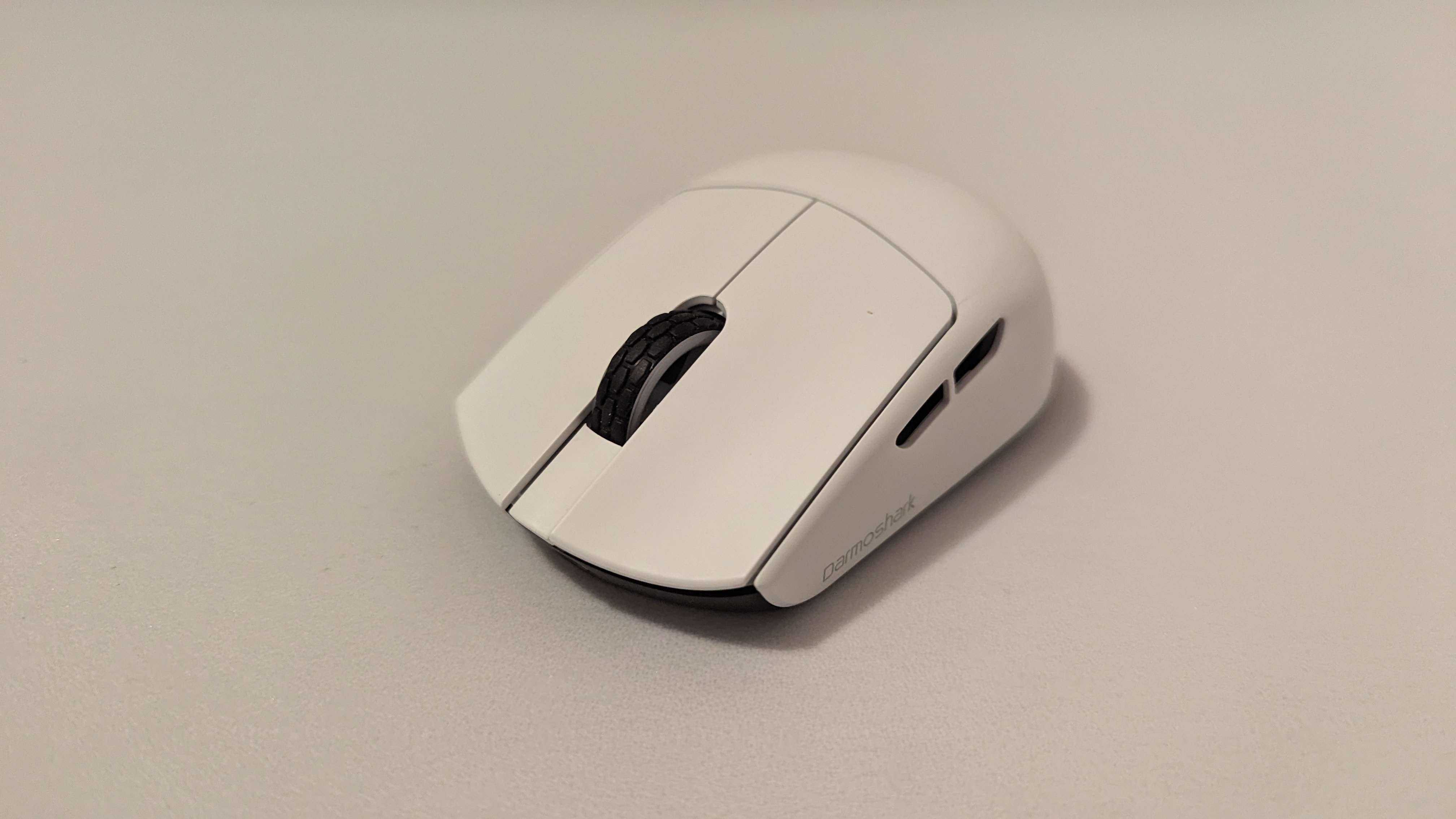
The Darmoshark M5. For all intents and purposes, this should be the evolution of the HSK Lite. When it goes on sales and, if the AliExpress listings are legit, you can find this mouse for really quite cheap. It’s a shape that’s safer and flatter than the HSK, which should make for the ultimate “just want to see what it’s like” kind of mouse. It’s even the same exact weight.
But Darmoshark is a brand that I want to like more. They feel like a diet Gwolves: started with some very shameless cloning and ended up using that success to start branching out into riskier shapes and ideas. But what Darmoshark lacks, and I can’t believe I’m saying this, is the QC of GWolves. I’ve owned three Darmoshark mice, and one of them had a left click that squeaked so loudly that I thought there was a living creature trapped in my room. All of that noise came from pretravel too, which there was a lot of. I ended up buying that mouse again later and it was much better, but the third one, which I asked for specifically for writeup, the Darmoshark M5, has an absurd amount of play in the buttons. While it may not come across that well on a video, imagine every time you left click, you feel the buttons wobble under your fingers. It’s just something that will constantly take you out of the game and make you aware of the mouse in your hand. The shape itself is solid but safe, removing the obtrusive hump and bulbousness of the HSK, making it feel thinner and more precise, but some may not like just how safe and “nothing” it is.
But even overlooking the QC issues, Darmoshark mice have one other issue that I… I have to bring it up. Every Darmoshark mouse I’ve ever used has had this feeling of floatiness to it, somewhat similar to what I talked about in the Keychron section, where things feel a little bit less responsive and reactive tracking/post flick adjustments became really hard. This has happened with all three darmoshark mice I’ve used: I play well in Gunfire Reborn where I tend to use my movement to make those kinds of small adjustments, but in games where I have to do it more with my mouse, it just felt a little off. I haven’t heard anybody else talk about this before, and it’s not just a pure latency issue so it doesn’t show up in testing, so I kept it more as a pet theory… until I used the Orbital Pathfinder. With no knowledge of the sensor tech or firmware, I noticed a very similar issue. So I went to download the software and increase the polling rate, and… huh. This UI looks familiar. I consulted Orbital, and they told me that they were indeed using Darmoshark firmware.
Now I need to make a big disclaimer here. I have only met one other person who has corroborated this idea, and it was more them agreeing with me than seeing it appear independently in the wild. Top level TF2 1v1 player dolphinrider is a big fan of some of the Darmoshark mice and doesn’t notice this issue at all, paints18 used the M5 for a few hundred hours in a huge variety of games and performed very well with it, also not noticing this issue. And my favorite Gundam Evolution player and now top level aimer YZK_Momoca did notice a little bit of latency, but wasn’t bothered by it. So, data suggests you won’t notice or care about it either and I’m just crazy.
Coming back to the M5, I think that at reduced prices, this mouse is still definitely worth a look. I think I want to put the M5 in C tier, but that’s mainly because of my sensor gripes. Considering nobody else really seems to notice them, let’s say:
B Tier.
Darmoshark M5 Air (sorta)
This mouse came out during the production of the video, and I got to use a bit before I published it. Here’s a brief rundown: it’s $110, they moved the battery up, so it has a slightly front heavy weight balance which I think is not bad. The left mouse button STILL wobbles somehow, the carbon fiber feels cool but is extremely slippery, the scroll wheel is really slippery, and there are a LOT of holes, including where my fingers rest. Aside from that, it feels solid! I will say that I’m impressed with the weight from a non-Gwolves brand and they actually bothered to try and fix the weight balance. So the only things that would be dealbreakers for me would be the wobble and just the shape generally still being the M5.
(Jan 1 2026) Now that some more time has passed, it seems like many people who have tried to main this mouse have given up on it. Too many sensor and QC issues to be worth it, even with tons of modding. If you have nothing to lose and don’t mind playing the QC lottery then… maybe you’ll get lucky. My experience has been pretty solid actually, I think 30g is a comfortable spot and my only QC problem is the button wobble. But the two people who I’ve seen talk about using it long term both reported sensor skipping.
I’d say it belongs between C and A tier. Depending on your RNG.
Darmoshark M3 Micro
Let’s go back to that other Darmoshark mouse now that it’s relevant to what was just talked about. So, watch the M5 section if first if you want to hear about some of my sensor performance gripes.
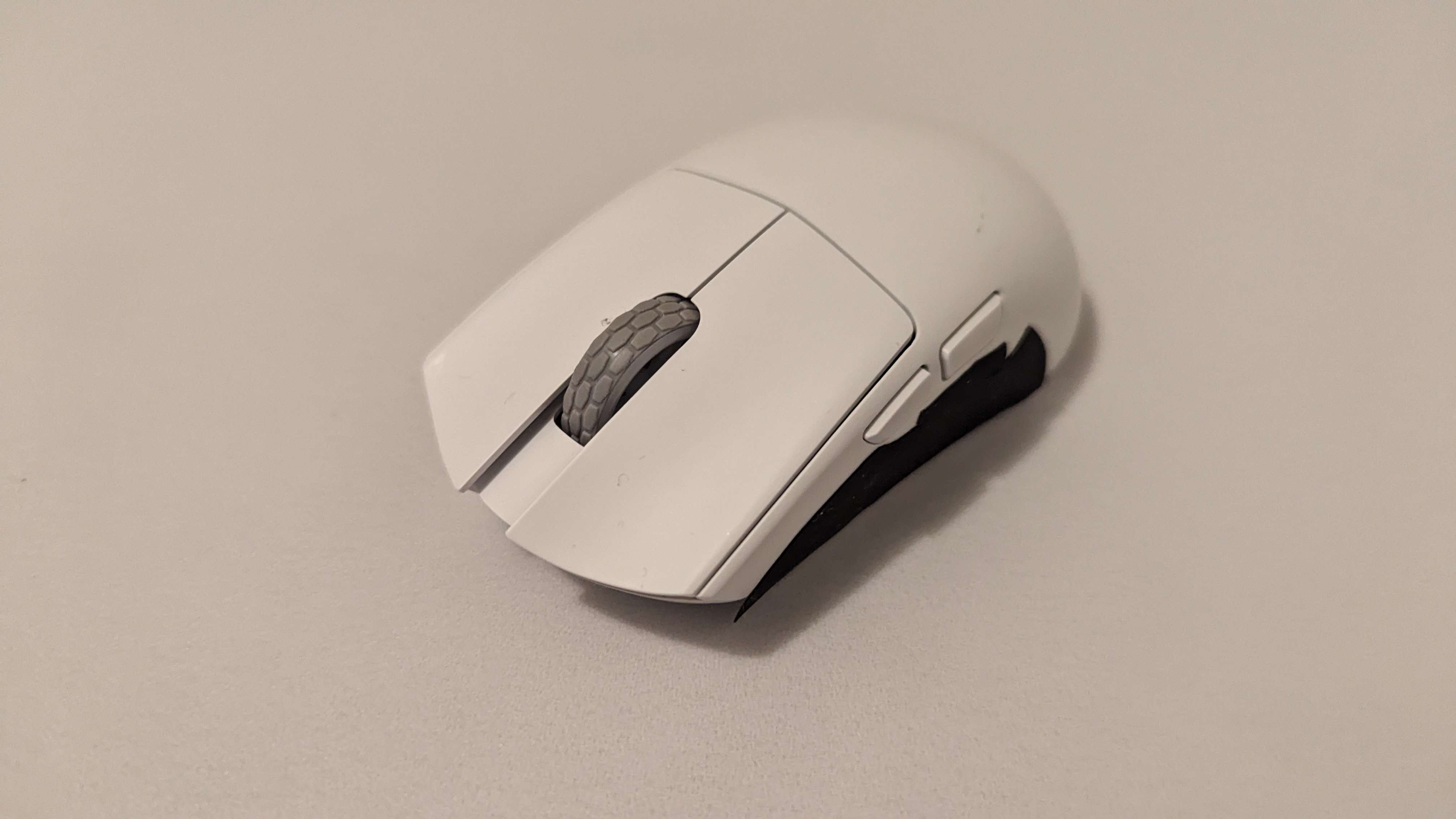
The M3 Micro. This is a mouse I was really excited about: kinda like what I wanted out of the HTX Mini at the conclusion of that video: similar length, but much thinner. I thought this could give me a more standard feeling weight balance, which may make flicks and arm engagement easier, but still give me full fingertip range of motion and the option for palm contact. It’s 42 grams, got 4k capability, and has extremely flat sides. Not amazingly inventive, but it had very unique dimensions for a mouse of this form factor.
The first one I got was a bit over a year ago, where I originally had that squeaking issue. Really terrible experience, I don’t think I’m that sensitive to annoyances like that, but after hearing it a thousand times with every left click, it drove me insane to the point of not wanting to use it. But when Viscose discovered how much the Pwnage Trinity’s battery and weight balance affected the weight, it reminded me of the M3 Micro. This thing also felt like 5 times the weight of the HSK Pro and way less responsive. On paper, that shouldn’t be the case.
So I bought another one while I was in Australia and decided to crack it open. Sure enough, the heaviest battery I’ve ever used in a mouse was in this tiny package, and it was localized in the back of the mouse. Once removed, that feeling of excessive weight and momentum was gone and it felt like a proper lightweight mouse.
I was super excited to try and use it, thinking of video ideas like “How I fixed my dream mouse” or something, but sadly, that’s where I ran into the sensor floatiness issue. I have a story in a video script that will come out sometime in the next two years, where I use the M3 micro, get tilted about playing horribly, and then bust out a $30 KPU clone and immediately start frying people with no mods.
Also I know I said I wasn’t going to mention coating, but this one is so bad that it makes Gwolves mice feel grippy. It’s like I’m holding an eel in my hands if I don’t have grip tape.
Overall, a cool idea in a new genre of mice that I’d love to see more fleshed out, not executed well at all, and not a very safe shape to begin with.
D tier.
Orbital Pathfinder
And we might as well talk a bit about the Pathfinder since it’s kind of a funny fingertip option too.
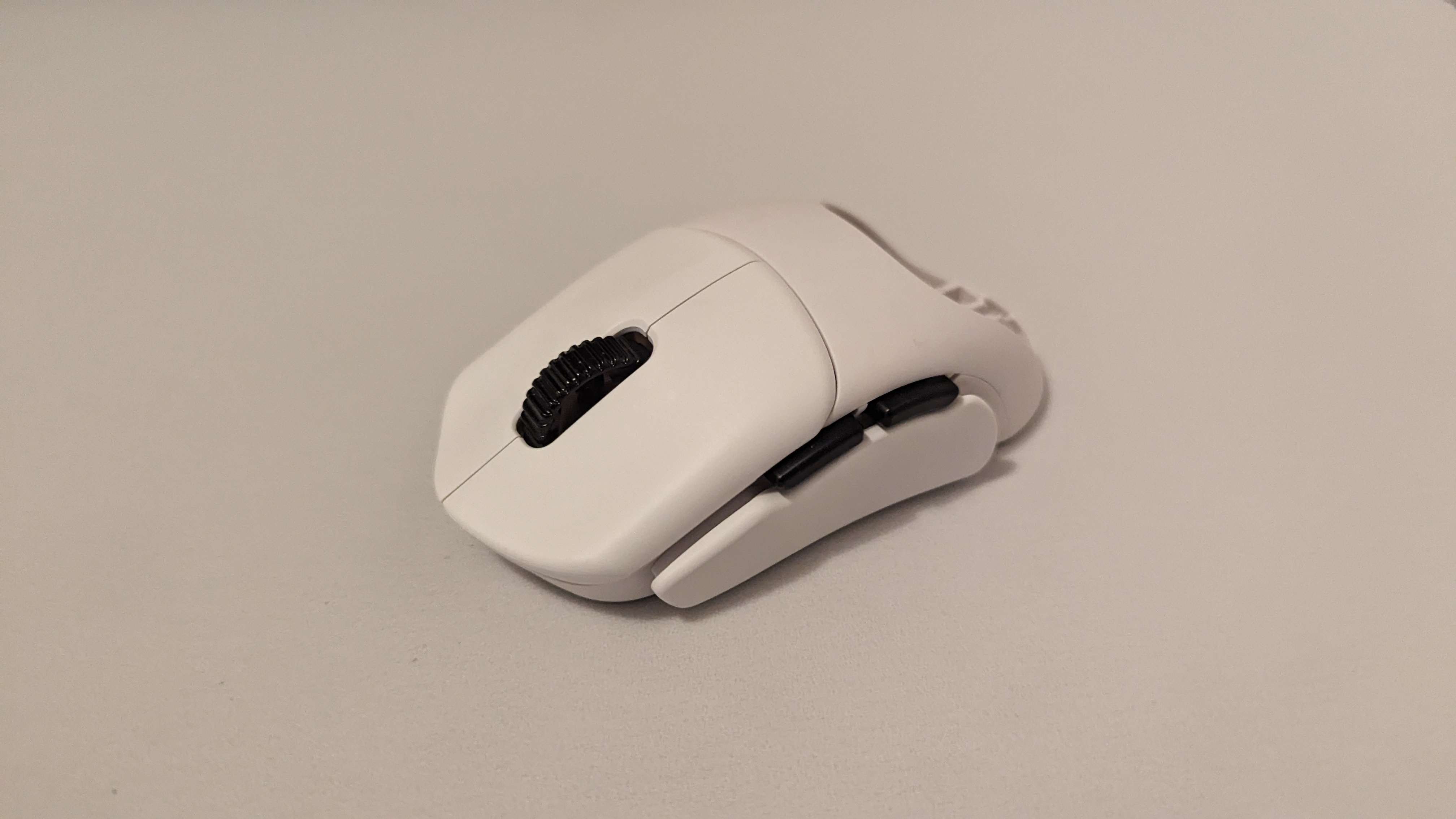
So, this is a modular mouse by a company called Orbital. It’s got an attachment for a right and left side curve and a few options for humps too. The mechanism is super simple, just snapping attachments on and off. The reason I’m including it on a fingertip tier list is because you can just omit the hump and have a thin, customizable mouse that has plenty of vertical range of motion.
I mainly used a config slightly reminiscent of the NP-01s, where it’s got a fairly subtle amount of ergonomic support, mainly for the pinky. I actually really liked this shape when I used it, and I think the execution of this modular idea is fantastic. Add onto that Orbital’s plans to continue adding more attachments and expressing interest in supporting this fingertip style with rail plugs, there’s definitely a cool idea here, especially if you like exploring shapes.
The only gripe I have at all with it is the latency or smoothing that I mentioned earlier. But again, it’s probably just all in my head. It’s also a little bit long and heavy as far as fingertip mice go, and the high button height makes it feel a bit imprecise.
Because of that, I’ll put it in:
B Tier.
G-Wolves HTR
With those mice out of the way, let’s go back to chronological order. Next, GWolves made the HTR and HTR Pro.
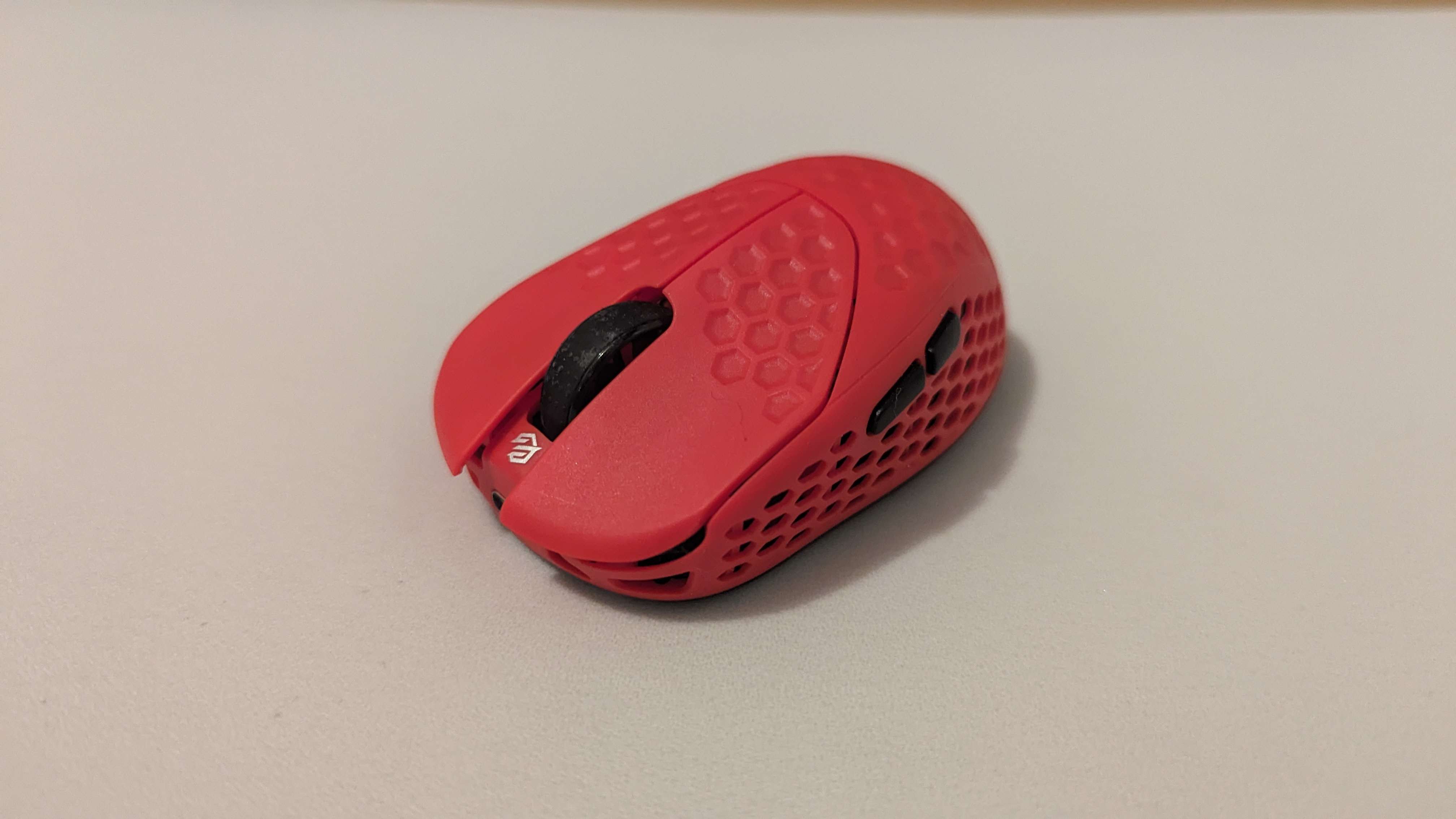
This thing was odd: 25 to 28 grams, 8k polling rate, and a fairly large mouse for that kind of weight. On paper, this mouse is top notch. But where the HSK Pro sported a light inwards taper, the HTR looks like… some sort of demented strawberry. This is the only mouse on this list where I don’t feel qualified to talk about it at all. I don’t understand it. Who is this for? Why is it more comfortable when I hold it backwards?
At first I thought it was because you were meant to use it with the GWolves clay, something they package in with every mouse now. And this stuff is actually really cool: you mold it onto the mouse in any shape you want, let it dry for a day or two, and then boom, you have your perfect mouse shape. I actually did this for a while on my HSK Pro when I felt like I could use some more pinky support. This… makes sense. Leave the whole back of the mouse empty to allow the user to mold the clay into the exact shape they want.
But everybody I’ve seen who likes this mouse NEVER uses it with the clay. For me, my first impressions were that the width at the front of the mouse made my aim feel a little bit more stable and less finger-centric, and the specs were super impressive for its form factor, but after about an hour of use my ring finger would start having some serious pain because of angle on the right side of the mouse. The shape made it feel like the mouse was constantly being pushed out of my hands. I was so confused why some people swore by this thing that I had to ask around.
YZK_Momoca, who I cited earlier, was my source. He gave me this demo and said this:
I like that there is no hump at the rear, which is common with other mice, and that the right side of the mouse bulges outward. When I operate the mouse with my fingertips with a normal mouse, when I extend my entire finger, especially my ring finger, the bump at the back and the inward dip in the right side of the mouse restricts my movement and makes it difficult for me to move the mouse.
So it seems like his wrist is completely flat, his thumb is towards the front of the mouse, and has both his ring and pinky forwards. Doing this and trying to pull downwards, the back part of the mouse on the M5 does nothing but get in the way. I kinda see it. Especially pulling down and to the right, I have way more range of motion horizontally with the HTR. I still feel like it’s kinda uncomfortable but this at least makes sense and is not nearly as awkward as it is with my normal grip. If you grip towards the back as well I don’t think it’s an issue either.
Now rating this is very difficult because I don’t fully understand the appeal. Is the idea good? Even if Momoca has found a valid use case, it’s so out there and specific that I struggle to imagine that this is what GWolves Jim had in mind. I dunno, I think it’s a weird idea executed pretty well, and one that would suit a small number of people. And I don’t really have anything negative to say about it other than the shape so…
B Tier? C Tier? It’s such an unsafe shape that I gotta say C, but if you like it, you’ll love it.
Also, unlike the HSK, the pro version of this mouse is actually a different shape. The back part of it is flattened into this little tail, the whole shell is one single piece, the curves are very slightly different, and it’s 25 grams. I would say that it’s better but… it’s hard for me to make that judgement call when I barely understand the appeal of this shape to begin with.
I also want to make a quick mention of the base design that G-Wolves have been iterating upon here though: Ever since the HTX, they have been experimenting with the idea of using the PCB to support the sides of the mouse and removing more and more weight from the base. The HTR is the first time they said, “fuck it just get rid of the whole base.” This, and their single piece shell idea, are actually really clever bits of design and between this and the batteries they use, are a big reason why GWolves are head and shoulders above the competition in terms of weight optimization.
C tier.
G-Wolves HTX Mini
The next mouse is the HTX mini, whose status as a fingertip mouse is arguable, but I’ll throw it in here since unless your hands are as small as mine, it would suck to do anything else with this thing.
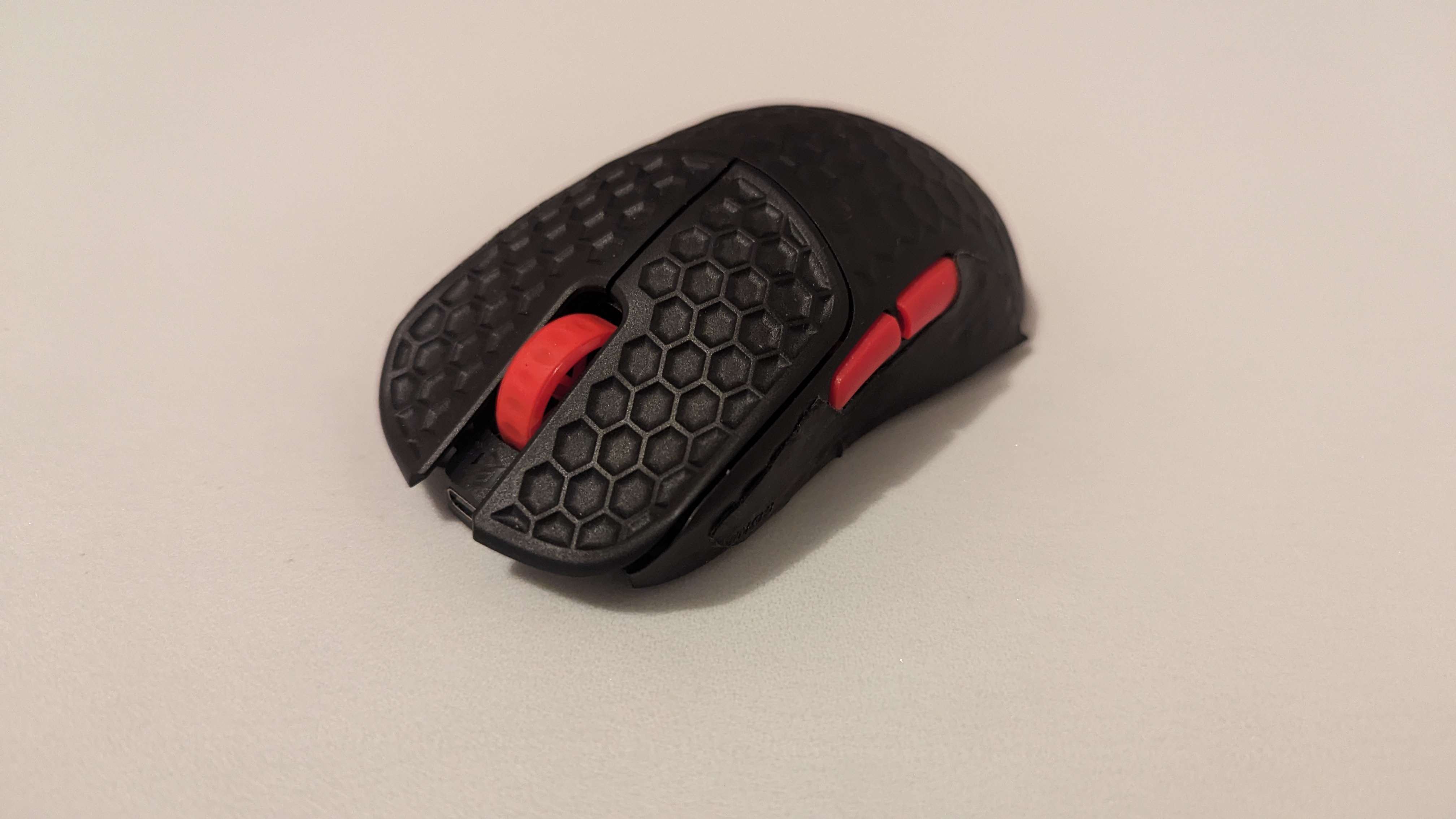
I won’t spend too much time with it here because I have a really over the top video of it on my channel already, but here’s the gist: It’s 27 grams, has 8k polling and great sensor implementation, and it’s got the normal dimensions of a mouse but scaled down vertically.
This thing has most of the benefits of fingertip mice with its range of motion and weight, but is in a much more approachable package. It doesn’t feel as foreign; you can engage palm contact whenever you want to and the button height is really low. The only strange thing is the sensor position being so far forward making it feel like you’ve got a higher sensitivity but only for your wrist movements. This was actually an intentional design decision by GWolves and it’s one that I found success with for target switching, but is a bit of an adjustment.
The only thing that stopped me from maining it is the width: even though I don’t have any vertical range of motion issues, they sadly did not scale it down horizontally to the same degree. Mice like the OP1 feel a lot less wide in the hands by comparison.
So, a fantastic mouse and it was the first one I considered maining in eons, but for my style, I ended up preferring the HSK Pro. Some people also don’t like how aggressive the side curvature is but I think the other elements of this mouse are so impressive that it is still a great mouse, and the weight is just insane.
A tier.
Also, there’s another mouse that’s come out recently with very similar dimensions called the HT-S2 Pro, which is actually quite cool! It’s got that single piece shell design and sorta similar dimensions to the HTX Mini. I imagine this would be an even more standard feeling mouse than the HTX Mini with its higher button height and flatter sides, but I’ve not had the chance to try it, and I think it would fall short of my favorites for the same reasons that the HTX does.
Pulsar X2F
The Pulsar X2F is a strange one.
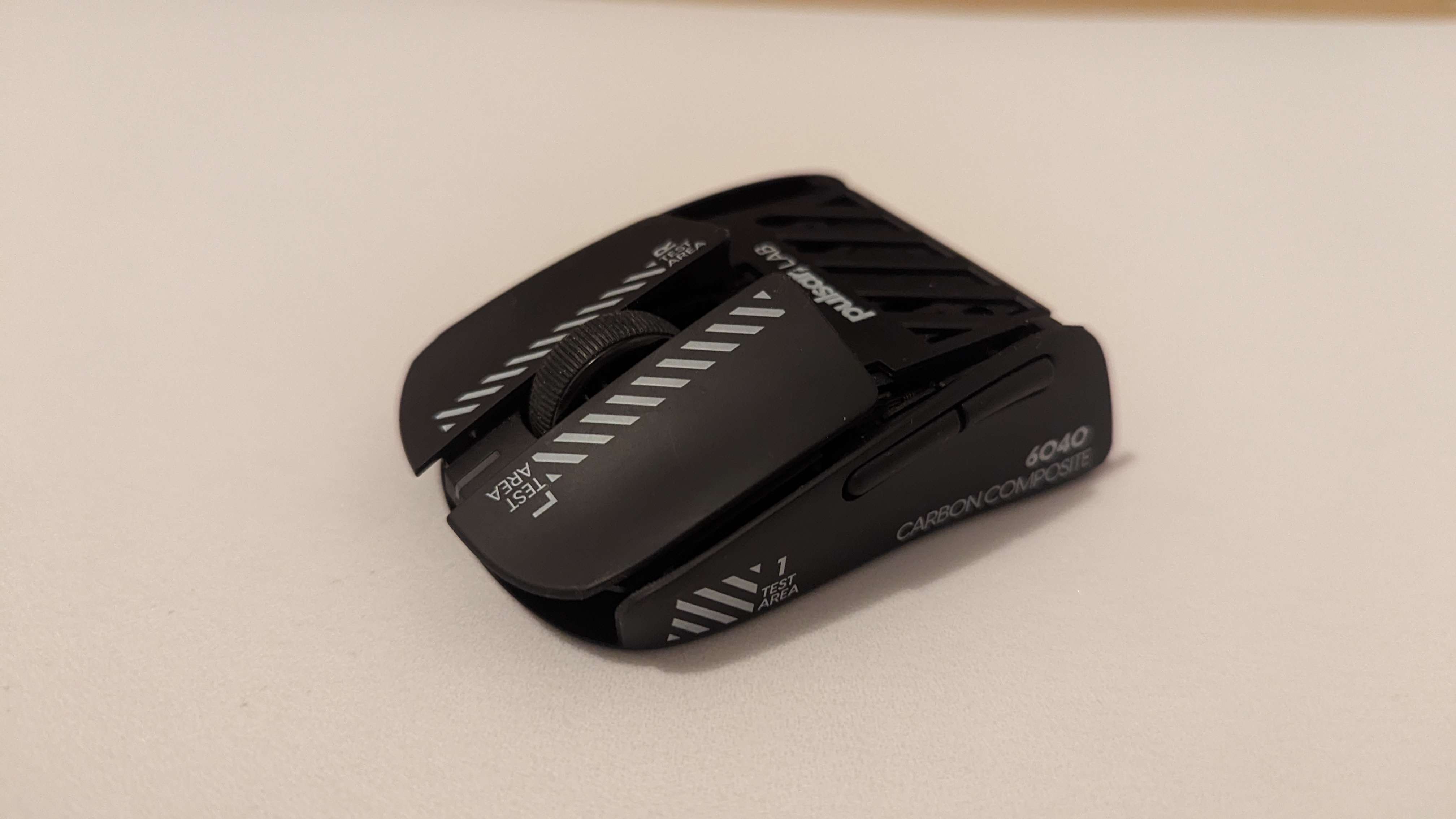
Let’s talk shape before we touch on anything else. I’ve talked a bit about how a lot of these mice can be classified as a “mouse cut in half,” but this is easily the most literal interpretation of that. Everything about it feels like holding a normal mouse, from its side curvature to its button heights and bulkiness. And it makes sense, it pretty much is just the front half of the Pulsar X2V2 Mini. Still though, while it is quite big as far as fingertip mice go, there is absolutely a subset of people who would love it for that. It’s such a standard experience that if the final version of this mouse has the quality of life of their other products like the Crazylight, this thing could easily be the new “buy this if you don’t want to think about it” option, like the GPX was, and would probably be endgame for people with bigger hands who aren’t looking for a super transformative experience.
I think the side curvature is the star of the show, it’s so subtle but so effective at making it not feel as boxy as the M5 and honestly feels quite agile despite being so far out of my typical width preferences. It’s a sleek experience and feels really intuitive in the hands.
But, I can’t speak on any other aspect of this mouse, and I can’t even say for certain my evaluation of the shape will be accurate when it comes out. Because the version I have is a beta, meaning that I kind of have to reserve any judgements I have of it, positive or negative. It had good build quality and the carbon composite they used actually felt quite nice in the hands, but it was also like 43 grams and my sensor didn’t work at all.
So in some ways, the program was useful, like they put these awful rings around the skates that would make any larger skate incompatible, which they are fixing in the final version. But in other ways, so many important aspects of the mouse were unfinished to the point where real conclusions cannot not be drawn about what the final end user experience will be like. Maybe the build quality will be worse once they get down to their final weight and maybe the weight balancing will be totally off.
But like… how did they fuck up the sensor that bad and how did they create a mouse 25% heavier than the mouse they cut in half?? Recently they’ve had such a solid track record that it actually kinda blows me away that something as basic as a functional sensor was not included, but in fairness I think it was only a handful of testers who got these. But it was so bad that I leaned over and said, “Hey Viscose come try this,” and as soon as she moved the mouse her face looked like she just witnessed a family member die, and her hand recoiled as if she just touched a hot stove.
I don’t know, I’m hopeful that they’ll get their shit together for the final release. This version of the mouse… It’s definitely F tier right? But that’s probably not fair because I got a defective copy. If I were to imagine a 30ish gram version with their usual sensor performance and quality, this could easily be in S tier. A true half mouse made out of a shape a lot of people already quite like for fingertip.
Final Release Thoughts
Hi, pingu from the future here. Since I originally wrote the script we have gotten some details about the first release version of the X2F. I believe they are gonna continue to iterate on this thing, but it’s 38 grams and $150. Really doesn’t make sense to me. How are we making a mouse with the same weight as the first commercial fingertip mouse that came out five years ago for three times the price? And it’s made so much more confusing by the fact that the fullsize version of this same shape is 4 grams lighter?? The weight was something beta testers commented on and they said “oh yea we could get it down to mid 25s” and then not only chose to not optimize it that far, but pretty much not optimize it at all? I think low 30s would’ve been totally fine. I dunno, the shape is really promising and the weight is probably gonna be fine for most people, but the price feels really steep for what it is. And I’m confused as to what the beta program was really even testing for.
Maybe I’m just hater because I’m pretty sure I got blacklisted from the beta program due to “failure to submit feedback.” But yeah, because the beta version is in F and the imaginary final version is in S, I guess we’ll just throw it in:
C tier.
WLMouse Beast Miao
Next, we have the Beast Miao.
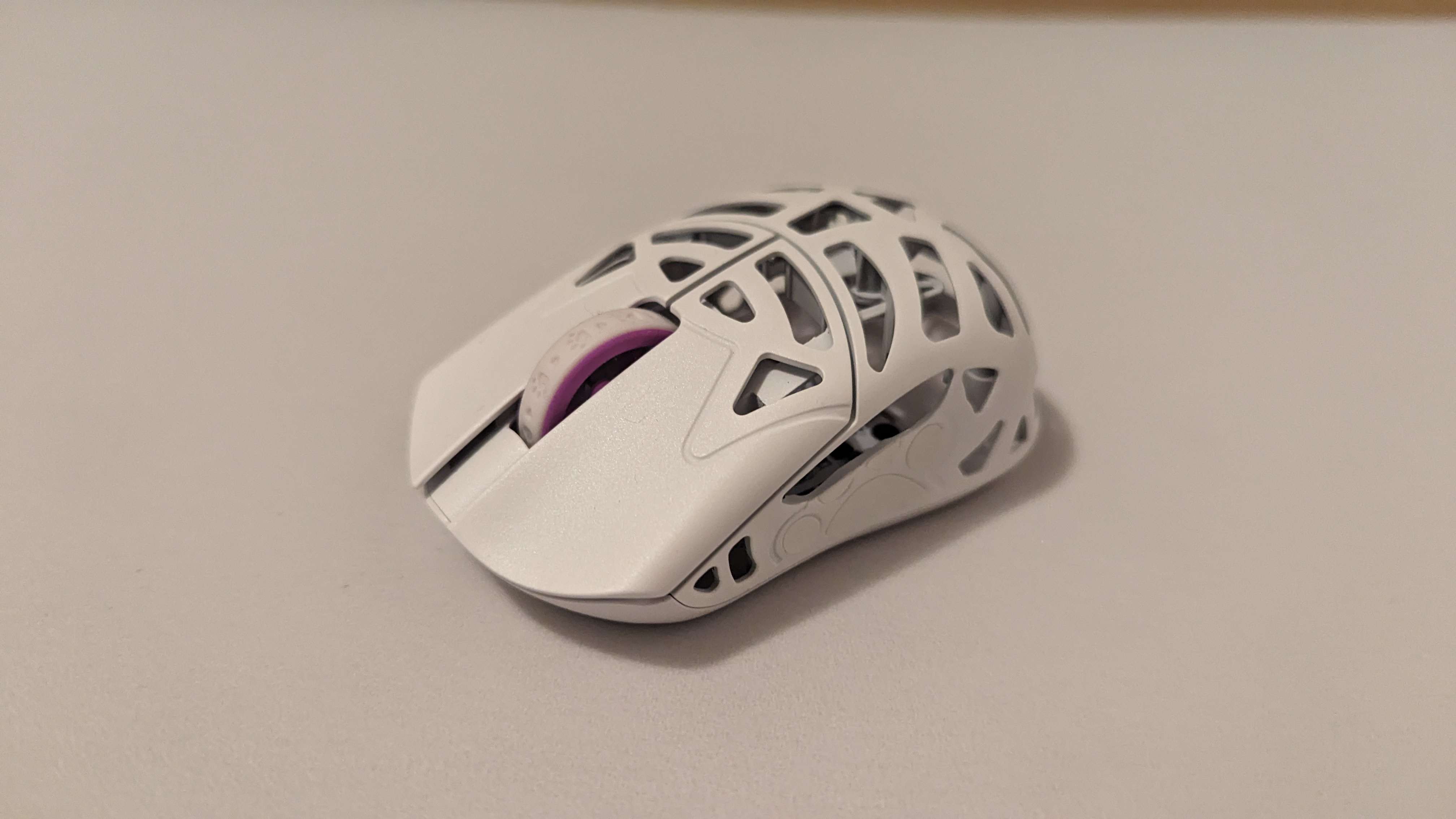
This was one of the most exciting releases on this list for me, from the aesthetic, to the WLMouse quality track record, to being able to finally own a magnesium mouse, to the really thin looking, but still supportive shape. But this mouse was… difficult for me. Of the new releases, I have put the most time into the Miao, and I still don’t fully know how I feel about it. So prior to this, I think every mouse can fit pretty neatly into that half mouse or pen mouse classification. But the Miao is the first mouse I’d say might be in the middle of these two.
The way it curves inwards towards the center makes the grip width thinner than any fullsize mouse, but in terms of dimensions and feel, it’s much more like a half mouse. Another thing that made it so difficult is the weight. First of all, it’s confusing to me how it’s 31ish grams when the fullsize beastx mini is 34. But the more confusing thing is that it feels even heavier than that. It might be a case similar to the pwnage trinity, where having all of the battery weight at the back of the mouse makes it feel a little unwieldy, to the point where I struggle to get the same level of finger activation as the hsk pro, it really feels like it’s double the weight.
However, I also think that this could be part of what makes the miao feel like an easier transition than something like the HSK. This was something I originally found uncomfortable when I first got into fingertip mice, where having the weight of the mouse distributed evenly throughout my whole hand was familiar, and having it only at front was odd. Maybe having the weight be more centralized in a similar location to fullsize mice makes it more welcoming to new fingertip users? I’m not really sure. But removing the battery made this mouse a completely different experience. I don’t think it overtakes the HSK Pro for me, but at least at that point it came down to shape.
The Beast Miao is a somewhat safe shape, I’d say safer than the HSK Pro. But the way they’ve created a fingertip shape is… strange: where the X2F took an existing shape and just cut off any unnecessary point of contact, this thing feels like they tried to take the Beast X Mini shape and squish it vertically until it became a fingertip mouse. So it’s symmetrical and doesn’t have the divisive inwards taper of the HSK Pro, but the way the sides scoop in and out so fast makes it feel a bit cramped. It sorta forces you to grip it how the mouse wants you to grip it and there’s not a lot of room for flexibility. Your ring finger ends up pushing into the outward flare at front, which to be fair, some people do actually like.
dolphinrider loves this aspect of the finalmouse shape, where he feels like he can actually engage his ring finger properly because of that point of contact. But the curve at the back is also really sharp: my pinky doesn’t feel like it’s stable because this supportive curve is so much smaller and sharper than the beast x mini shape.
If you don’t curl your pinky and your grip seems to align with this side curvature, you’ll probably enjoy this thing a lot and I can recommend it. Or if you don’t use your pinky or fingers in general to articulate the mouse, then it probably won’t be a problem either. I honestly expected more people to have issues with this shape, but I’ve had a good number of friends and acquaintances pick up this mouse and I’ve not had any of them tell me it’s crazy uncomfortable for them.
But all of my shape nitpicks aside, I think I’d still recommend this mouse to people if they’re passively curious about fingertip mice and want something a little bit more modern than the HSK Lite. It feels like the easiest transition out of any of the mice here, aside from maybe the X2F, and there’s something about it that makes it feel a lot more standard than most. And despite my issues with the curves, the fact that the mouse does get so thin in the middle is still a positive for me; looking through my finals montage, a lot of the clips I’m most proud of came from when I was testing the Miao.
Two last things that might be worth mentioning: this mouse has a pattern embossed on the side of it. It’s a little bit annoying to me, but they do include some stickers to fill it out and make it basically imperceptible. And some people are having sensor skipping issues but I haven’t experienced that personally, and I polled 5 people who have one and they also don’t.
So, all in all, I think I’m still going to put it in A tier. I initially leaned towards B because of the weird feeling of weight and my gripes with the shape, but the package that WLMouse offers here is still complete enough to make me feel like most people wouldn’t regret buying this thing.
A tier.
G-Wolves Fenrir Max
The Fenrir Max. The successor to the HSK Pro, my favorite mouse of all time. Here’s what the shape looks like.
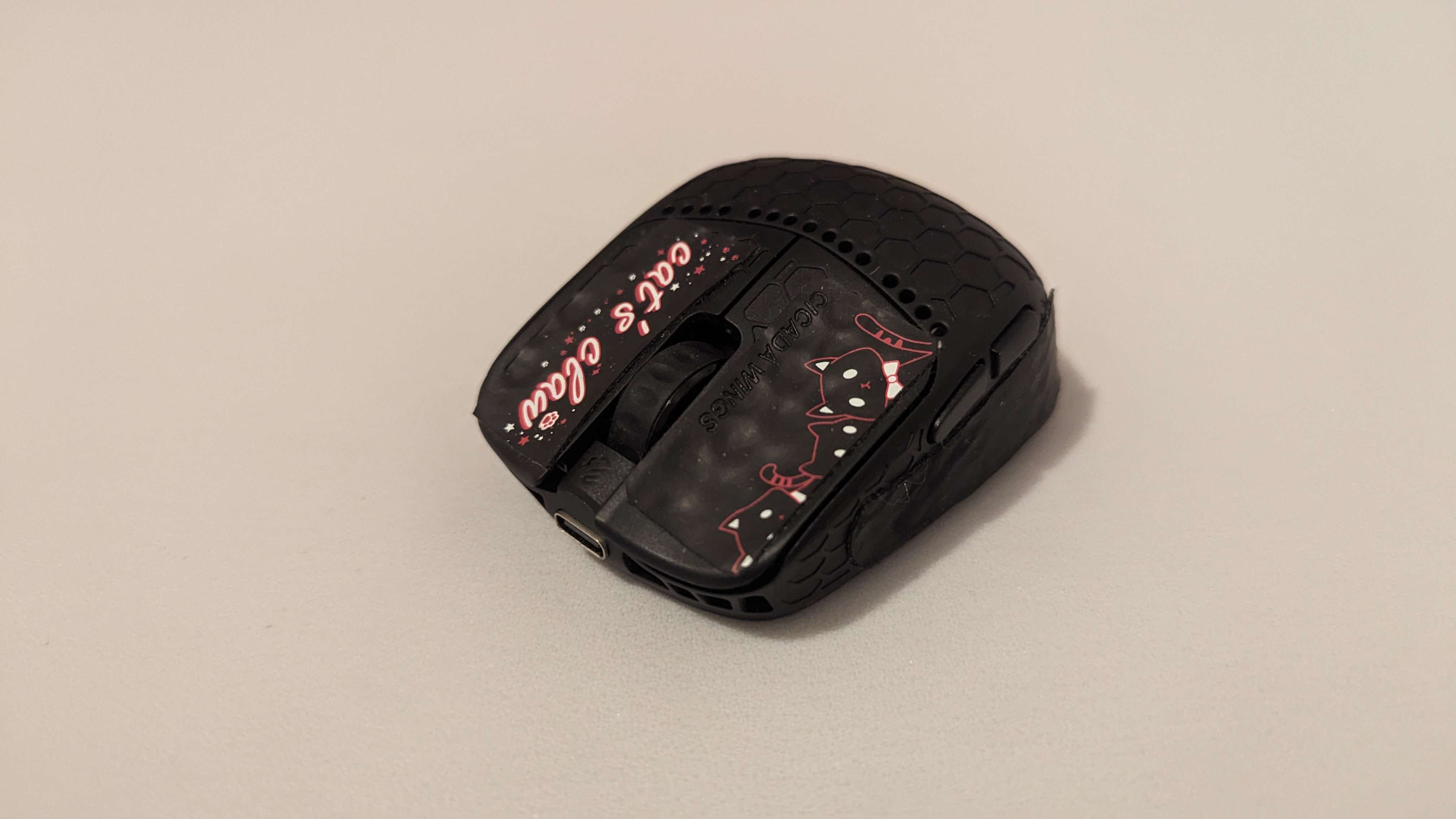
It also has that inwards taper, they optimized the base to get it down to 23 grams, and the build quality is great.
When I heard it was coming out, all of my HSK PCBs were compromised. I lost the dongle to one, another was being used in a lunar lander, and the other had been taken over by the symbiote. I missed using the HSK, but I thought, well, I can just wait for the Fenrir Max and main that instead! But after using it for an hour, I immediately went to reassemble my HSK.
The Fenrir Max to the HSK is like… Dark Souls 2 to Dark Souls 1. There’s clear parallels in the design, the level of polish is still there, and they’re both pushing boundaries in some way, but… so many of the things that made the first installment so special and genre defining were just…. gone. That isn’t to say that it’s objectively bad. It’s just not the same thing at all, and going into it with those expectations were what made it such a dissonant experience.
This thing is WIDE. Like even compared to medium sized fullsize mice, this mouse is beating them out. And that’s really the crux of it: the insane level of finger engagement the HSK Pro promoted was gone for me, and it was so wide that my pinky started to really hurt after a single session with it. I didn’t even mind the increased button height, it’s just the width. My fingers being so inactive and the mouse being so agile did make arm based flicks feel pretty good for me, but the loss of precision was not worth it. To get a better understanding of how much of it was just my small hands, I did a poll on twitter asking what other people thought, and the results were mixed. Most people were pretty lukewarm; I only found one aimer who absolutely loved it, though my sample size was tiny, and she has 18x10 hands. So, maybe this is the HSK Pro for people with big hands? Or maybe it’s good for people who don’t physically move the mouse with their fingers much? but then again, fortnite demon paints18 also has 19x9.5 hands and could never get it to be as comfortable or agile as the Darmoshark M5. It’s hard to say.
The trouble is, everything about this mouse on paper is objectively good. Super solid feeling, absurdly weight optimized, and all of the other GWolves bells and whistles. It’s just not my style. I’m not even sure it would belong in the “half mouse” category, it just feels so lightweight and stubby that the label doesn’t feel apt. But it’s definitely not penlike haha.
So where would I rank it? It’s tricky to say, but the fact that so many people of differing hand sizes seem to be kinda mixed on it, makes me think that it can’t be more than B. I do think that for some people this is an S tier mouse, but I don’t have a wide enough sample size to find out the exact use case this is for.
B tier.
G-Wolves Fenrir Asym
Then we have the Fenrir Asymm
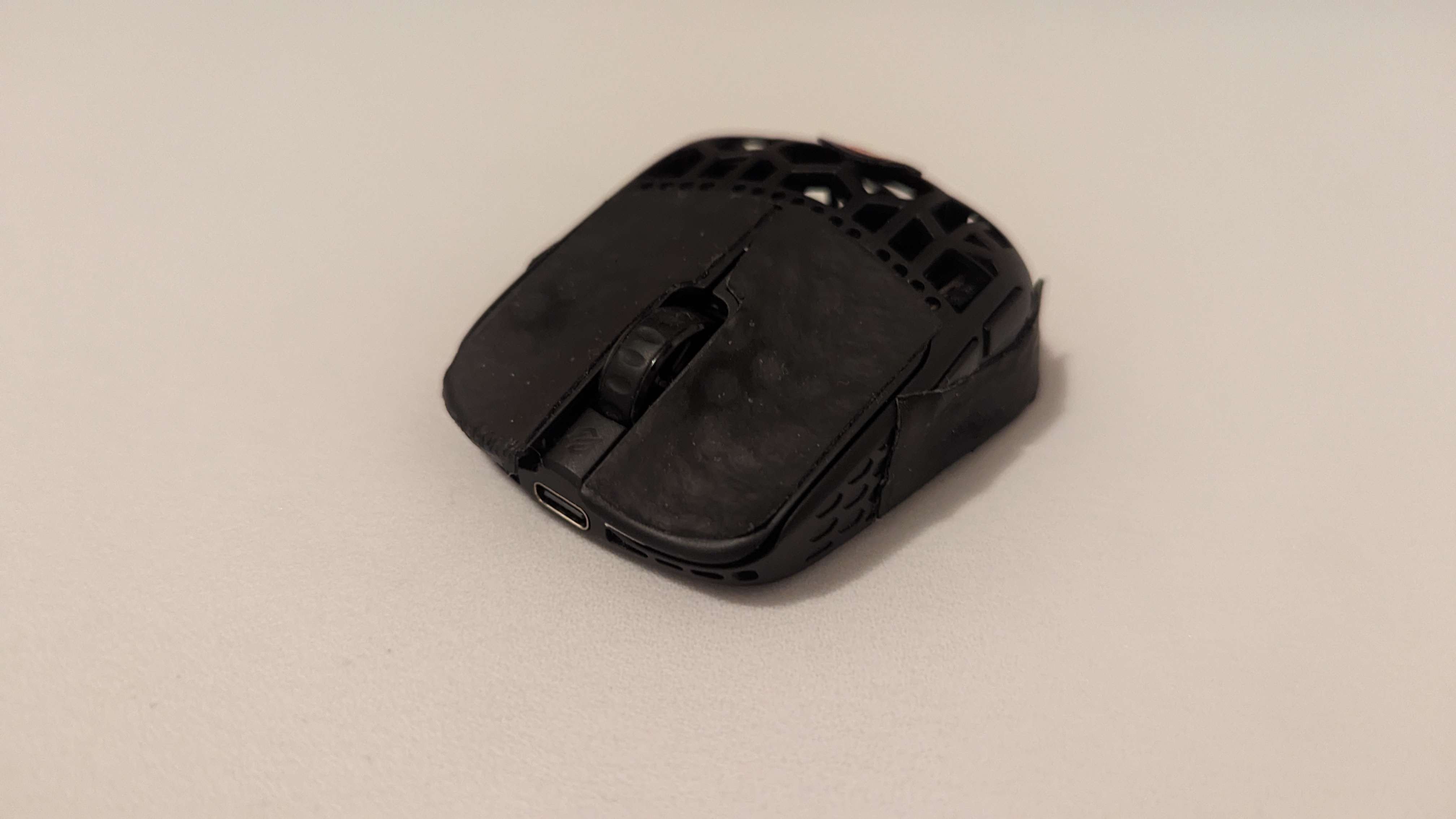
An ergonomic 20 gram fingertip mouse with some inspiration from the HSK Pro. The mouse I checked the status of my order on more than any other mouse here. I have tried to create this exact shape countless times on the HSK Pro, with ancient putty from my basement, to trying to commission a 3d printed attachment, taping a lego onto it, and even the KPU fingertip mods are somewhat derivative of this idea. Everything was done with the idea of pinky support: one of the things I thought could be improved on the HSK Pro.
This is a niche on top of a niche, and it’s hard to understate how small of a net this thing casts. If you grip with your ring and pinky forward, you get horrible range of motion. Slightly bent and it’s okay, but either your grip width becomes super wide if you hold it at the back, or the asymmetry is basically doing nothing if you hold it forwards. And generally, if you try to hold the mouse towards the back, I really can’t see it being comfortable or the curvature being useful, regardless of grip.
However, I should be in the exact niche for this. I grip in a fairly aggressive claw frame with my pinky curled, and most of the mouse is under my hand. My thumb aligns with the sensor perfectly and my pinky sits nicely on the curve. It also does have some clearer inspiration from the HSK Pro: the inwards taper is much more noticeable than the Max and the button height is absurdly low. So is it perfect?
Mm. No. After I tried the Max, a lot of my excitement for these mice started to dwindle, because the width of the max caused me pain in my pinky and reduced range of motion. I don’t experience pain with the asymm, but it is still very wide. So, fairly comfortable and while the support does feel nice, my pinky has a hard time doing very much.
However, the pinky curve is made far worse by another issue with this mouse. Symmetrical button height. One essential feature of ergonomic mice is how the left mouse button is higher up than the right; usually with the whole mouse being on an angle. Using this kind of pinky curve and not providing asymmetrical buttons has been my biggest bugbear on all of the ergonomic fingertip mice I’ve tried so far.
Take the KPU shape: with a slight angle on your hands, the pads of your ring finger and pinky are aligned with this flare in the back of the mouse. It makes it really easy to pull downwards and it’s slight enough to still allow for plenty of fingertip engagement. By encouraging a flat wrist angle with these flat buttons, it’s more the sides of my fingers rather than the pads in contact with the mouse now and the level of comfort and control is diminished heavily.
With the button grooves, I can kind of get a little bit of an angle on my fingers, but it’s not the same as the mouse shape itself supporting this tilt. And as much as I think low button height is a good thing to shoot for, I think combined with this asymmetry, it ends up feeling quite uncomfortable. EIther that or they found the limit of how low we should be pushing for. Also, because this mouse’s profile is so low and G-Wolves is committed to having side buttons, it makes it so that my relatively small thumb barely fits under these buttons. For bigger thumbs, I think you will have to disable or remove the side buttons.
So, it’s not quite the mouse I had dreamed up years ago, and I’m not really sure how this shape would appeal to. If you like holding it really far forward, you can get just a very light curve on your pinky and end up with what’s essentially a lighter, flatter, and wider HSK Pro. Or if you don’t move your fingers vertically at all and think the outwards flare would support your pinky well. Everything about this mouse on paper is really great, stupidly light but incredibly solid, GWolves sensor tech, and probably the best buttons I’ve used in a fingertip mouse so far. But it’s probably the least safe recommendation out of any commercial fingertip mouse I’ve tried. I have never gotten so many dms telling me they’re planning to return a mouse before.
I guess it would go in D tier. This is now the lightest commercial mouse ever, and everything about it, like the max, is great, aside from the shape. But the shape is so questionable that I can’t really give it anything higher.
D tier.
OKAY so, this is something I wrote after about two weeks of usage and since then, this mouse has gained quite a fanbase. At first it was just redditors and peripheral reviewers who seemed to really like this thing, and I chalked it up to favoring comfort over ingame performance. I want a fingertip mouse to lean into what makes them uniquely good at what they do, like fingertip mobility, because just being a lightweight object doesn’t seem worth it for all of the downsides and hurdles that fingertip mice throw at you.
But then, smoothness extraordinaire sillydomi bought one… and she’s immediately averaging the same as her pbs, which are often pushing for world records. So suddenly my earlier excuse doesn’t really hold water. Here’s my theory: she has 21x11 hands, her previous mouse is over double the weight, and she has never used any other fingertip mouse. It is still true that the only aimers who I have seen love this mouse are people who have never used any other fingertip mouse. So we still can’t isolate the benefit of this particular mouse over other fingertip mice, and it could just be the benefits of fingertip mice as a whole.
(since then I have spoken with Ninja Atlas, and he prefers the Asym over the HSK Pro, but he has his wrist in the air and has larger hands than me.)
It could be a love it or hate it thing, it could be a big hand thing, or it could be a question of how much you want to use your fingers. I don’t really know. But because of how many people are loving this thing, I have to bump it up to at least C tier.
C tier.
Zeromouse Blade
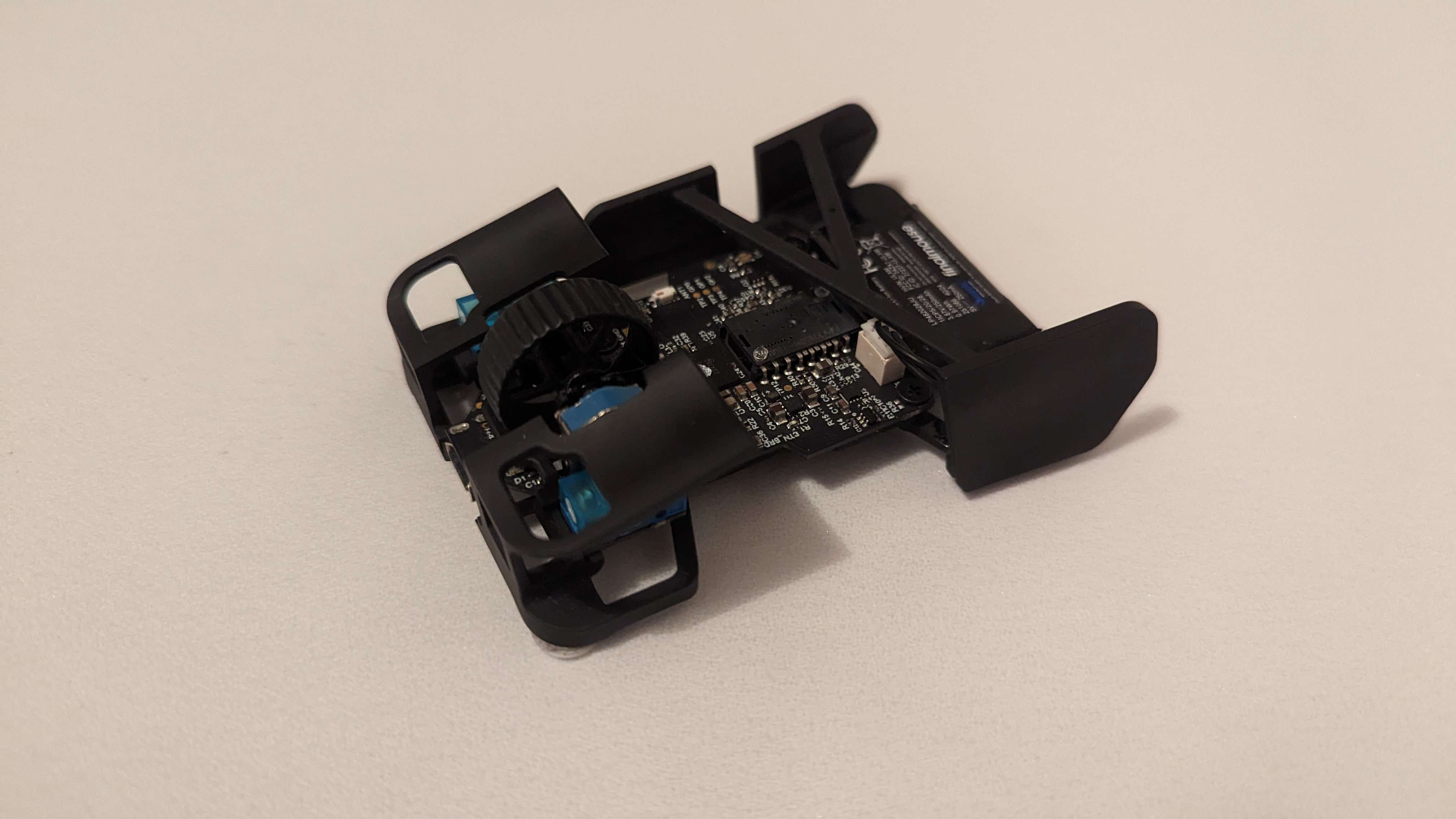
For a year or two now, I’ve had the video idea to make my dream fingertip mouse. I had planned to have a skeletal frame, featuring an outwards curve for pinky support, an inwards dip for the thumb, a focus on a normal sensor position, asymmetrical button height, and push for a thinner profile than the existing asymmetrical fingertip mods. But this mouse is not my dream mouse. This is Optimum’s. A 21 gram 3d-printed mouse called the Zeromouse Blade. To me, this still feels like a passion project driven by one nerd’s super niche set of needs. And I have a lot of respect for that.
Before we get into any further discussion about the mouse’s shape, I want to address the main complaints that people have voiced. How does it feel in the hand? It’s 3d printed after all, and typically products like that will feel rough, brittle and ready to fall apart under pressure. The Zeromouse… does not. Either because of the material or the finishing Optimum has done, these mice feel really nice in the hands. It’s grippy, smooth, and there’s only a minimal amount of give when you push on the sides. While it doesn’t feel as rock solid as an OP1, it’s pretty good considering how much material has been stripped away.
The next big question is the click design. And honestly, it’s genius. Essentially all of my 3d printed mods that don’t copy this idea struggle with wobbly and unstable clicks and this design completely dodges that pitfall and promotes a nice downwards slope on the buttons. I’ve heard from some people that it ends up feeling way harder to actuate because of the reversed clicks, and while they do feel like they do have a bit more travel than most, I will take that over the wobbliness any day.
Then, there’s durability. Viscose and I have (accidentally) performed one single drop test from desk height… and one of the supports snapped. Thankfully I already had super glue on hand for some other 3d printed mods and repairing it was very easy, but in some ways, it is as fragile as it looks. There was a post recently about somebody’s Zeromouse exploding after a flick with both of the buttons flying off, and I don’t think that will happen to almost anybody, especially since that was an old modkit version of the mouse, but it is a mouse you do have to be gentler with than most.
Alright let’s get into the meat of it now. How good is this shape? I mentioned earlier that this mouse is still a passion project designed for one particular niche set of needs… and that is kind of a bad thing. I like to grip fingertip mice with my thumb aliged with the sensor and with pretty bent fingers. If I try to do that with the Zeromouse Blade, my thumb is grabbing at air. Well, what happens if I try to grip with my thumb in the middle of the paddle? Oh. I can barely reach the buttons. To me this feels symptomatic of designing a mouse for himself and then just happening to get waves of comments asking him to make it purchasable. The fix would be extending the thumb paddle forward and allowing it to accommodate a wider range of grips, but he didn’t.
It did present a kinda cool opportunity to have an edge for my thumb to work with since I had to grip so far forwards. Sometimes it felt like having that edge enabled me to get a crazy amount of articulation and involvement; I started thinking of titles like “How Optimum Accidentally Made My Perfect Mouse.” But… either because of how far away the mouse buttons were or the lack of stability my thumb had made it way harder to engage any of my other fingers for that fine articulation.
Speaking of engagement, the biggest issue that both myself and Viscose ran into was arm engagement, specifically blended motions where you start with your wrist or fingers and gradually begin to incorporate your arm. For me, this kind of motion was harder with this mouse than almost any other mouse I’ve ever used. I have three theories as to why this could be happening.
1) The position of the thumb paddle.
- It’s possible that having such poor support for my thumb, index and middle finger makes me feel unable to lean into my less precise muscle groups. 2) The second is weight.
- I’ve always found it easier to engage my arm with heavier mice, and it’s possible that we’re pushing weight so far that I don’t have that subconscious confidence that I can stop bigger, grosser movements. But if it is this, it wouldn’t be the sole cause, because I don’t have this issue to nearly the same severity with my other extremely optimized mice. 3) And my last theory is weight balancing.
So let’s talk about pen spinning for a moment: If I want to have the maximum amount of control over the motions of the pen as it’s passed through my fingers, I will work with the balance point. This is especially true when I try to do those same motions with heavier objects; most tricks only feel remotely possible when I’m directly on the balance point. When I’m not on the balance point I have to really work with the momentum, and if I don’t, it’s extremely easy to generate an excessive or uncontrollable amount of it.
The reason I bring this up is because the balance point of the Zeromouse is at the front third of the mouse. You cannot place your thumb on the balance point even if you wanted to because there’s just nothing there to grab onto. I accidentally tested for this for a bit because of another issue I think the mouse has, where when you first get it, the battery is not attached (apparently this is fixed in v2) We might just be stupid, but Viscose and I decided to wedge the battery under the supports to hold it in place. It worked like a charm, except we unknowingly made the balance point issue significantly worse. After I wrote this whole spiel about penspinning I had that thought of “oh wait where’s this battery meant to go,” checked Optimum’s video, and saw that we were doing it all wrong. But I also don’t really see how it’s meant to attach… both of these came with the battery loose and no amount of finagling allowed us to nest the battery in a secure position at the back. So I busted out my trusty superglue again. And moving the balance point closer to the center did make the issue marginally better, though it was still very incompatible with my grip.
We also had one other dealbreaking issue that made it completely unusable on soft pads (also fixed in v2): when pressing down on the left mouse button, a bit of plastic on the bottom of the mouse digs into the pad slightly and creates a feeling like dragging a lego across the mousepad. Really difficult to aim well while that’s happening. It was a much smaller issue on mid pads, and obviously, not at all on glass. We thought it was just an oversight from being a glass main, but after Viscose mentioned in passing that we dropped the Zeromouse, she woke up to a DM saying that he heard about it and has another one coming her way. Such a cool thing to do, crazy he caught wind of it, and it also gave us the ability to test for copy variance. Despite visually looking identical, this scratching feeling on the pad is much a smaller issue. Still noticeable if you really push down, and I dunno, maybe that could be some new stopping power tech for you, but was never an issue ingame with this copy.
So, all the details aside, how do I feel about this mouse? As a passion project, it’s so so cool and I think he executed on a lot of his ideas extremely well. As a product, it’s a bit of a hard sell at $150. If you think that you are in the same use case as Optimum, or that it looks like it would fit your grip welI, then yeah, it’s quite well done and feels a step or two above my other 3d printed mice in terms of quality. But my grip, an aggressive fingertip grip with 16 cm long hands, is selected against REALLY badly. If I’m not totally locked in I aim SO badly with this thing because it’s so far out of my comfort zone.
For most other youtubers I think I’d be a lot more critical about creating such a divisive product at a price like this but… I struggle to hold it against him. I’ve been into 3d printed fingertip mice for a couple years now, and the landscape has COMPLETELY changed since he released his videos on it. He’s reinvigorated the space singlehandedly; every modder has heard of the mouse, so many mods borrow ideas from it, and a ton of them only got into it because he made it seem feasible to get into. Optimum made something he wanted, experimented with ideas never done before in the space, and people wanted him to sell it. Fair enough.
But I still have to take away some points for the issues I mentioned, how alienating against people outside of his use case it is, and the pretty terrible value proposition it presents. Let’s say:
C Tier.
3D Printed Fingertip Mods
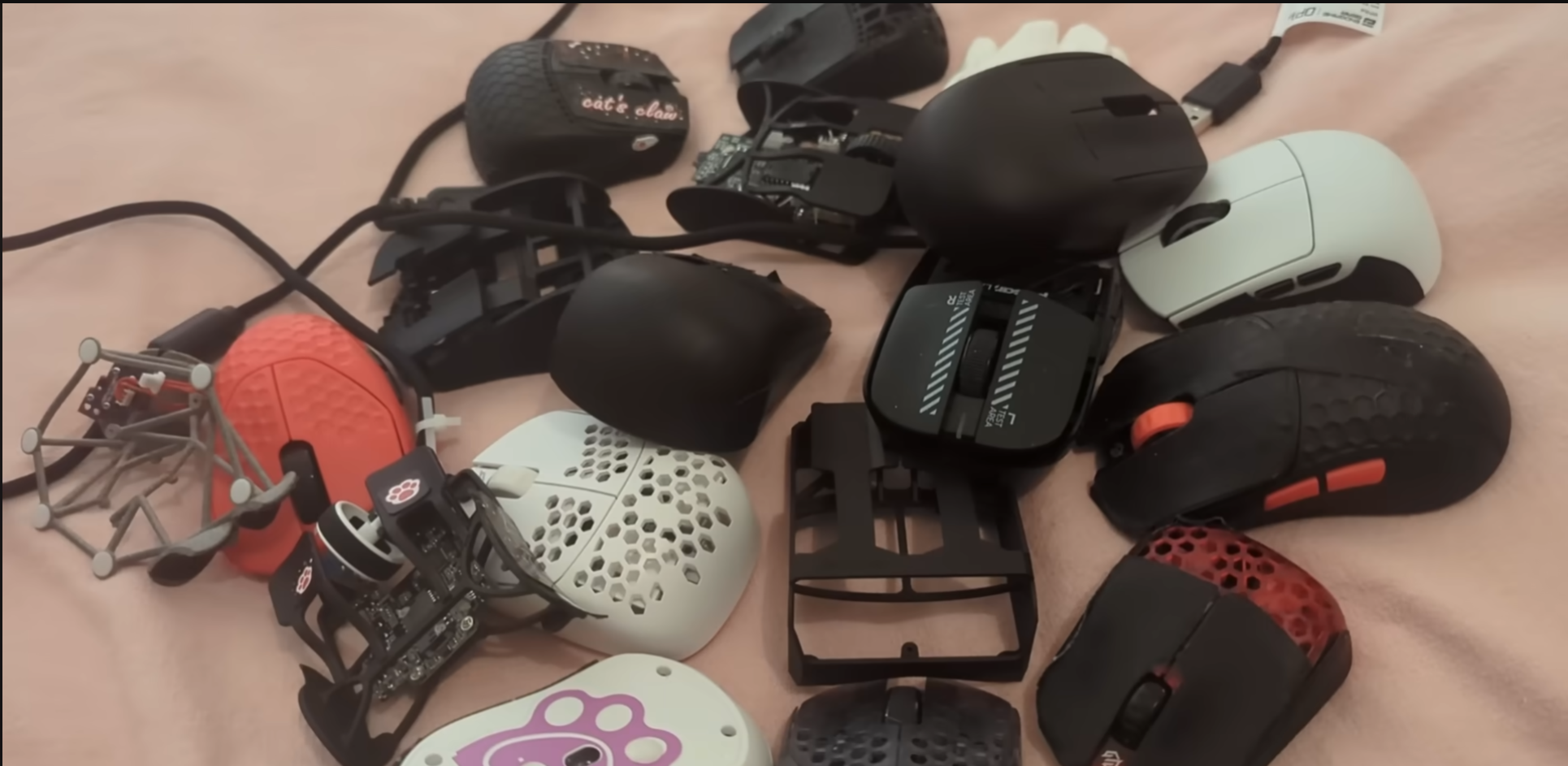
And our last mouse is the entire genre of 3d printed fingertip mods. I have tried about 14 different fingertip shells, and I think with the right design, there could be something really interesting here. Here’s the rundown on these mice: First, the main way that I got my shells was through services like JLC3DP, Zelta3d and FacFox. These companies will take a 3d model file, print it, finish it, and ship it off, all for cheaper than any existing fingertip mouse. If there was a really well designed 3d printed shell, I could just respond to people wondering if they should try a fingertip mouse and say “Yeah, if you’ve got an OP18k, just print out this shell for $20 and see if it fits you!” It would be such a low risk way to try fingertip mice.
Second, the really good mods with grip tape do feel quite normal in the hands, I wouldn’t even know it’s 3d printed. And lastly, there are some ftip mods that are essentially just the points of contact for your hands, and others that are more standard looking. Those skeletal looking mods are the ones I typically respect more, usually they’re the ones trying out new ideas and optimizing some random variable that they really care about. Ones that have full shells have been kinda disappointing in my experience, with the modder just taking an existing shape and rounding off the back. Some of them also have bases that warp easily, others don’t consider how removing the back will affect the grip, and others don’t optimize for weight at all. I think in the right hands this would be the preferable route, but these seem to have less creativity and much more room for error.
But my main issue with them isn’t the flimsy build quality or the divisive shapes: it’s the pcbs they choose to use. Commercial fingertip mice all get their own pcbs designed to make sense in the shell they are created for. But mouse modders typically care more about wide availability, ease of designing around, and performance. So, that’s why we saw a million mods with the G305, then the Viper V2, and now the OP18K PCBs. But, here’s the issue. The sensor ends up all the way at the bottom of the mouse. Somewhat recently Viscose thought about all of the mice that she played badly with but liked the shape of and low sensor position was the common thread between them. I find it really uncomfortable too, it makes it so your wrist based movements much slower, limiting your wrist’s range of motion and forcing you to cover wider distances on those wrist based flicks. There are some people who like this, feeling like a “lower wrist sens” helps them with precision, but for me it just created so much ambiguity and uncertainty on flicks that immediately went away using a normal sensor position.
Now, there are exceptions to this rule. If the mod incentivizes you to hold it all the way at the back, or that’s just how you like to grip fingertip mice, this might be a nonissue. And while the Viper PCB seems a little cooked, there are op18k mods that have fairly central sensor positions. This is something the creator has to think about though, and not all of them do.
However, even with the OP1 pcb, there is another issue. The scroll wheel encoder. The HSK Pro is able to have low, full length buttons because they made a tiny scroll wheel and encoder for it. But nobody is using that PCB in their mods. Instead, the solutions range from very high buttons, to forcing your fingers apart, to cutting holes in the buttons. As somebody who tends to grip with my middle finger very close to the scroll wheel, something I had never even had to think about until I tried these mods, this is pretty uncomfortable. Again, this comes down to grip style, but it seems like everybody is trying to work around the problem rather than address it. Every single skeleton mod I’ve used has had one of these two issues.
Including the:
Mighty MM8K
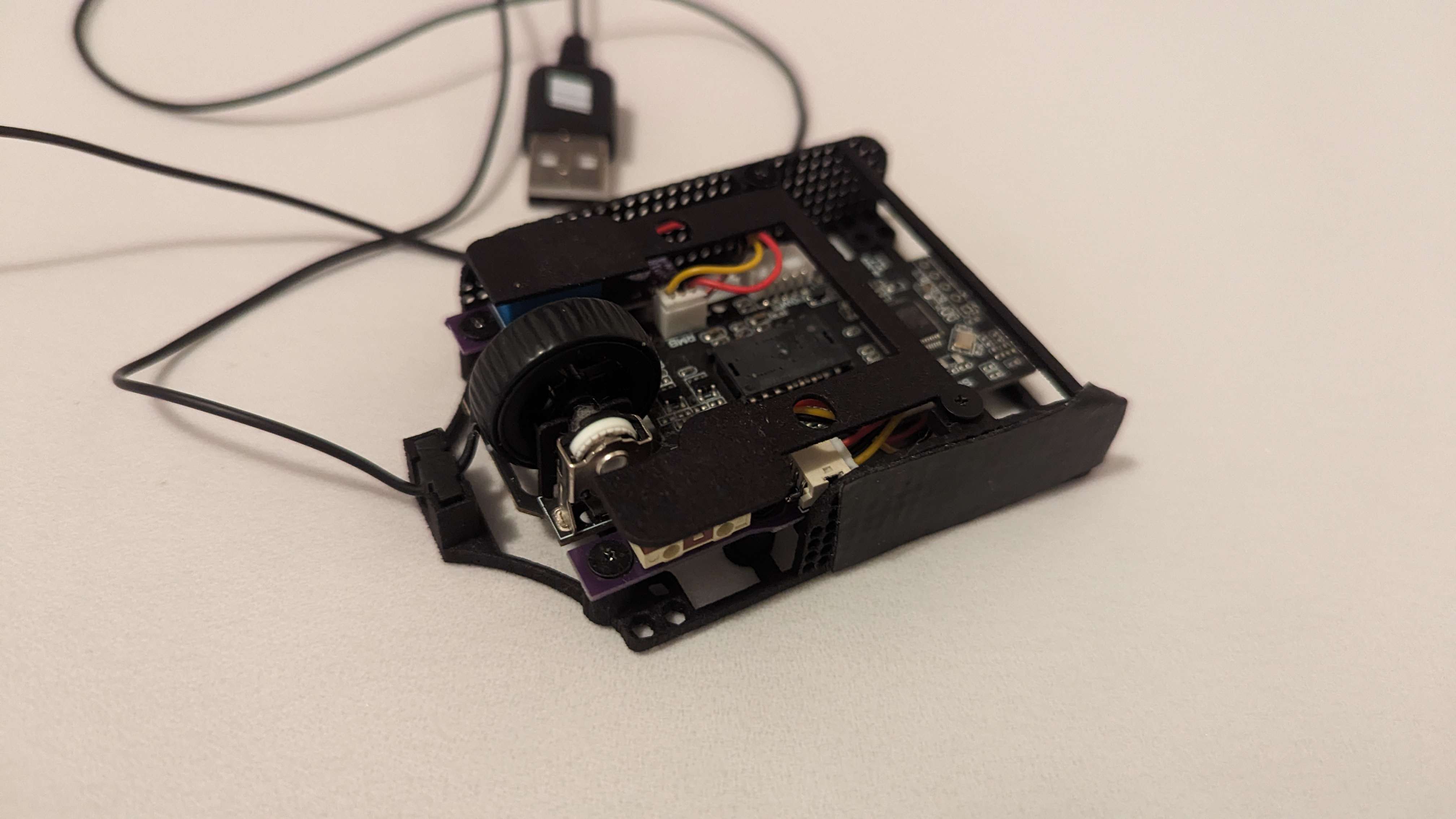
A 20 gram modkit by MightyAims. My main issues with it almost all seem to come from it using the OP18K PCB. The buttons have to be really thin and completely flat instead of downwards sloping to make them relatively low and they’re too far apart to be comfortable for me to grip. It does seem like he tried to close this gap as much as possible, which lead a right click design where the click paddle makes contact with the microswitch on the rightmost edge of the button. Trying to use the left edge of the paddle, which is where I’d like to place my middle finger, creates either a ton of travel or just fails to actuate the switch at all. And the OP1 cable as well, while totally fine on a 50 gram mouse, starts to feel really noticeable on something as light as this. While it feels much better with an aftermarket cable, it’s a pain to have to spend even more money on an already pretty expensive modkit.
This shape is… okay for me. It’s basically just a rectangle, but with the buttons being flat too, it’s even more “nothing,” than the Darmoshark M5. In some ways that’s not a bad thing because it won’t overtly alienate anybody’s grip style or hand size, and is small enough to allow for a respectable amount of finger engagement, but it also doesn’t specialize in anything other than weight. It’s an original design, so I have to give Mighty props for that, but I do feel noticeably less precise and supported than the HSK Pro.
But there’s definitely a noticeable gulf in quality between this and the Zeromouse. That kind of brittle, plasticky experience that 3d printed stuff is known for is basically what you actually get here, though it does come with my favorite grip tape so it masks it a little bit. However, pushing into the sides reveals a very noticeable amount of flex, and while I feel confident enough to apply that pressure without fear of it imploding, it’s still not a great characteristic to have. There is also a decent amount of button wobble, and the middle mouse button often fails to actuate or forces the bottom piece of plastic to scratch on the pad, but it’s not that big of an issue while in use.
The build process itself is easy and simple and the improvements over V1 are really sound: the sides now accommodate a larger number of users instead of hyper-optimizing for his own grip, and using the side buttons screws to affix the mouse buttons is clever. Though, after screwing the buttons in and out a few times, one of the screws no longer holds the buttons in place. So overall, it’s an okay experience to use, it’s pretty well designed, it’s insanely light, and I don’t think it will be most people’s favorite shape but at least it’s inoffensive. You can probably find some random rectangular object around your house and try fingertipping it and you’ll get a decent idea of what the experience is like too. And I get it, the OP18K is a very performant PCB that a lot of people have it makes sense to design a modkit for it.
The MM8K… It’s between B and C. I’m leaning C because of the issues I have with the clicks and the excessive boxiness of the shape. I honestly struggled to write about it because it doesn’t really have too many noteworthy characteristics. I think the fact that it’s so safe would be a really great reason to give it a recommendation, but $50 minus shipping for a modkit is pushing it for that particular use case, especially when it also demands a cable mod and a donor pcb. If you want a mouse that’s pushing the boundaries of weight and you’ve got an OP18K PCB, this is a solid option.
Back to General 3D Printed Thoughts
For 3d printed mice as a whole… stuff like the GS from gabesmousemods is really close to being an easy recommendation, and if you can get it printed for really cheap, it’s definitely worth a shot before if you’ve already got the pcb. None of the mods are that close to endgame for me though and I think you’ll run into the some of the issues I mentioned with pretty much any mod, but this is a space that is only recently gaining traction. With the zeromouse, opt1p, mm8k, and other mice starting to reach larger audiences now, this is a niche that I expect to be able to fully recommend in a couple months time. Someone will come around and release an STL file that will become the new jumping off point for fingertip mice, or maybe I’ll do it myself haha. And other people will continue pushing ultra specific niches that only a few people will enjoy; I’ve enjoyed talking to some of the modders pushing boundaries a lot recently, they’re really passionate people. If you want to look into some other fingertip mods, you could check out GabesMouseMods, Haunterwell or QWorkDesign. I’ll put something in the pinned comment if something exciting comes around.
2026 update: The F1 by QWorkdesign/RinProductions is really close to dethroning the HSK Pro for me. It’s a super well designed mod that’s 10g but still feels more stable than basically everything else I’ve tried. But it’s a bit too wide and angular compared to the HSK Pro to take that #1 spot.
Closing Thoughts
So yeah, that’s it. Thanks for sticking it out to the end. As an HSK Pro fan I dunno when something else that small and precise will come around commercially, so we may be waiting on modders to keep pushing that niche. GWolves have claimed that they will be releasing three more fingertip mice this year, one of which reaching under 20 grams, so that might be exciting. But either way, it’s been cool to see the space finally get some other players in it testing out new ideas and I expect that it will only continue to grow. I’m sure there are other nerds out there like me who basically don’t use anything else now.
Thanks for reading.